



I have always stressed that headlines and text copy matter a lot on landing pages. We have published a number of case studies which provide a proof in case: 127% increase in conversions by doing a headline change and single headline change increased conversions by 90%. This case study is also similar in essence: text copy around main headline was A/B tested and large gains in clickthrough and signups are seen.
AwayFind helps users step away from their inboxes while still letting them receive important and urgent emails in a timely manner by notifying them of those emails via SMS, Voice Call or iPhone/Android apps. They wanted to improve conversion rate on their homepage which gets a mix of traffic from organic, direct and PPC (Adwords) sources.
Headline is the first thing a visitor notices on a page. If it is not clear, a visitor would just take a broad look at page and leave after a few seconds. But if your headline catches his attention, he would try to understand more about your offering by looking at the copy. So, getting headline right is crucial but getting copy right is equally important. AwayFind have an interesting headline which says: Checking email every 5 minutes? Stop! In their original page, this headline was extended with another headline (of exactly same size, font and color). It said: Let us find your urgent messages. Here’s how their homepage looked:
The team at AwayFind thought of simplifying the copy around headline and slightly changing the layout as well. They used Visual Website Optimizer for doing this A/B test. Here’s the variation:
Variation (91% increase in signups)
Note how they removed second part of headline and instead replaced it with a sub-headline.
AwayFind thought the new copy was slightly more compelling and that the new layout draws the eye more naturally to the call to action button. And, by jolly, they were right! They saw a 42% lift in people clicking through from the home page and a 91% lift in people completing the setup process. They admit it themselves: the results were shocking! Small change, big results.
Regarding Visual Website Optimizer (VWO), they mentioned that VWO made it easy to implement the test and even easier to track the results.
What they learned was that a little copy can go a long way. Four new sentences dramatically improved their results. As a follow up, they are planning to test the new copy with the old layout to see which of these variables created the biggest impact–a more direct copy comparison.
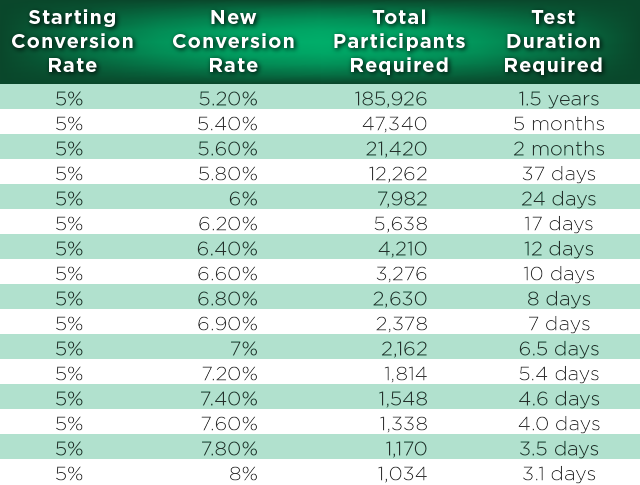
Numerous times our clients and customers ask: how many visitors do I need to test in order to get statistically significant results in an A/B test? Unfortunately, there is no straightforward answer to this question as it depends on a number of factors. In the past, we have provided you with an A/B test duration calculator in Excel and also provided with an online tool to calculate the same. However, how it is calculated is sort of a black magic.
In following presentation, I describe just what exactly happens when we calculate number of visitors needed for an A/B test. As the presentation aims to be a high level overview, I won’t be delving into mathematics of it.
Hope you like the presentation! Please let me know if you have any questions or need clarifications.
Usually navigation menus are common across all pages of a website. But, should you have navigation menu on a landing page as well? Or, should your landing page be unique in itself and there is no need to include global navigation menu? This is a perfect case for A/B testing and one of our customers, Yuppiechef, did this test and found out that removing navigation menu doubled their conversions.
Yuppiechef is a leading online store selling premium kitchen tools throughout South Africa. They are known for their customer service, quirkiness and passion for getting people excited about eating together and spending time in the kitchen. They used Visual Website Optimizer to A/B test the effect of removing the navigation menu from one of their landing pages.
Yuppiechef wanted to increase the rate of Wedding Registry signups (conversion goal) generated from the Wedding Registry landing page on their website. They tested two pages against each other that were identical, save for the main navigation bar at the top of the page. As simple as that. On that landing page, there was a mix of various traffic sources including: Google Adwords (Search & Display Network), Facebook, 3rd Party Advertisers, Directories, Organic Search and Direct traffic. Here’s how the original page looked like:
Original page (with navigation)

As far as designing the variation is concerned, the hypothesis was that the option without the navigation bar would provide fewer distractions, and help the user focus on the primary reason they had landed on this particular page. Here’s how the variation looked like:
Variation page (without navigation) — 100% increase in signups

They were certainly surprised by the results! The new variation of the page without the navigation bar at the top of the page delivered twice as many conversions as the original page! The conversion rate jumped from 3 to 6% with an effective 100% increase in conversions. Who wouldn’t be happy about such results?
This is what they thought about results: “Simpler is better. Try assist the user in focusing on their primary objective by eliminating distractions.“. With regards to A/B testing tool they used, this is what they had to say: “Visual Website Optimizer provided an easy and efficient way to implement the test in no time at all. The reporting was also detailed enough to give us the insights we needed to declare the test an unequivocal success.”
Hope this case study gives you an inspiration to test navigation menu on your own landing pages. We don’t guarantee that you will also increase your conversions by 100% but this test is certainly an easy one to setup. And, who knows, maybe you do significantly increase your conversion rate. The only way to find out is to actually setup an A/B test.
Apparently, small changes can have big impact on a company’s bottom-line and this case study is perhaps the best example of it. Length, structure, position or design of forms can have tremendous influence on conversions. We have a number of case studies that demonstrate the same. One case study describes how removing a signup form (from landing page and adding it in later steps) increased conversions by 60%. Another example is of our own homepage: when we removed the form and converted it into a popup, signups increased by 50%.
This case study is about an A/B test run by Springest, which is a platform to help people get the most out of themselves and their career by connecting them to the best ways to learn and develop personally and professionally. Eduhub used to be their brand name in The Netherlands. Their business model involves providing brochures to the visitors who request for them (once they find a suitable course provider). Brochure is free, but users need to fill a lot of information in the form to access it.
Springest aim was to increase form completions on the brochure information request form. So, they decided to use Visual Website Optimizer to create alternative version of the form and see if it increased the form completion rate. Here’s how their original form looked like:
Original brochure request form
They tested one variation of this form, with some parts changed. They removed the intro text and logo and added social proof to the sidebar: quotes from users and logos from well-known Dutch brands. They also removed the asterisk for required fields and changed it to a ‘optional’ text behind fields that are optional. Here’s how variation looked like:
Variation (generated additional €50,000 for Springest)
The variation resulted in 5.21% improvement in form completion, with 97% certainty (statistical significance) based on over 2,500 conversions. They were partly surprised, because the form itself hardly changed. Their changes were mostly about taking away possible obstructions or doubts in the user’s mind and it seems the social proof removes doubt for at least some of the visitors. Although 5% doesn’t look like much, it adds directly to their bottom-line; they estimate this change to be worth about €50,000 this year alone. Isn’t that a great ROI for doing such a simple A/B test?
Based on this test, Dennis Paagman (from Springest team) had following learnings:
You should watch out for too much explanation and guiding texts, we think the text above the form was confusing and maybe even increasing user’s doubt. Just let people find things out for themselves and don’t explain everything. Forms are so ubiquitous on the web, everyone knows how to fill them in.
Even though Springest are extremely happy about results of this test, they don’t want to stop improving and they already have extensive plans for follow up tests. For this form, they want to split it in two parts and also test it with less fields. As soon as they launch a complete new layout of their website, they plan on A/B testing every part of it.
Springest think Visual Website Optimizer (VWO) was very valuable when it came to this particular test. This is what they have to say about the tool:
The great thing about VWO is that it’s possible to run tests without the need of developers. The editing of text, even within form labels, works flawlessly. We did have to change something in the actual Javascript used to make the test (this is in VWO’s advanced options) work, because we have a slightly different form for each product.
The best thing about using VWO is that when we think of new ways to test our site, we have the possibility to implement them right away.
We are very happy for Springest as they increased their conversion rates significantly. This case study definitely shows how even smallest of changes can have such large impact. So, always keep A/B testing and, of course, we recommend Visual Website Optimizer for doing the same
The case study we are publishing today answers a dilemma that many software companies encounter at one time or another. Should they offer a “free trial” option? Will it decrease the paid signups? One previous case study answered which button increased clickthroughs by 47%: ‘Try demo’ or ‘Buy now’. This case study answers whether having both at the same time has any effect on sales and conversions.
GetResponse is one of the leading email marketing platforms in the world with more than 210,000 customers across 183 countries. They prominently place a “Buy Now” call to action button on their homepage. They also have a “Free Trial” plan but it was not available on the homepage and could only be found on certain pages. Here’s how their homepage looks like (notice the prominent “Buy Now” button”):
GetResponse wanted to test if adding a “Free Trial” button on the home page will influence the number of purchases of paid accounts and number of registrations of free accounts. There was a perception that providing a “Free Trial” button will decrease the number of signups so it was quite a critical test. They used Visual Website Optimizer to quickly setup an A/B test in which variation had an extra “Free Trial” button next to the “Buy Now” button. Here’s how the variation looked like (notice two prominent buttons):
Variation: 158% increase in trial signups
The results they found after running the test were astonishing. GetResponse noticed that by adding free trial buttons on homepage, the number of free accounts increased by 158.60%, while there was no negative influence on the number of paid accounts created via homepage. That is a very strong proof in favor of providing a “Free Trial” button on the homepage itself.
On asking what lessons can be derived from this test, this is what Agnieszka Dabrowska, GetResponse Brand Manager had to say:
It’s worth testing different variations of Call to Action (CTA) on the homepage. We expected that by adding a free trial button on the homepage the number of paid accounts would decrease. We were positively surprised by the results. Not only did we manage to keep the sale at the same level, but we also noticed a huge increase in the number of free trial accounts, which will also result in a bigger number of upgrades in the future.
She further added, “Visual Website Optimizer (VWO) is a great tool that lets us test different variations of the homepage on a small sample of visitors. Thanks to VWO, we managed to find out the perfect combination of CTAs on GetResponse homepage and increase the overall conversion”.
GetResponse plan to constantly run different tests with Visual Website Optimizer. They will test effectiveness of different tag lines, order form versions, pricing variations, etc. We hope they always keep increasing their sales and conversions.
We have published quite a few case studies in past regarding the positive influence of call to action buttons. The testing could be in the form of adding a call to action button when original design didn’t have one, testing a different one or even in the form of different text for each call to action buttons.
Consolidated Label, one of our customers, A/B tested a new design with a prominent call to action button on their test page. Their original web design did not have any call to action buttons so they tried making an A/B test with one. They did expect an increase in conversions but they didn’t expect it to produce 62% increase in conversions over the original design. The testing helped them gauge the difference a single button can make. Consolidated Label manufactures custom printed labels for retail products in a variety of markets including Food, Beverage, Health & Beauty, and Health markets.
Here are the screenshots of both the Control (original design) and the variation (new design).
Control
Variation (with call to action button) 62% increase in conversions
On asking what lessons they learnt from testing, this is what Tracy Gamlin of Consolidated Label had to say:
Make your desired conversion goal obvious, but harmonious to the rest of the design. Also, giving people a few places on a page to get to the conversion accommodates different types of users. For example, the people who just want to get a quote get their button at the top of the page, whereas people who need more substantiation get the opportunity to quote further down the page after they’ve read more copy/seen more images.
Tracy further added, “We’ve found VWO to be immensely valuable for all of our testing needs. Ultimately, it confirms our feelings with actual data – and many times it even surprises us!”.
If you still haven’t started A/B testing, now is a good time to give Visual Website Optimizer a try with unlimited simultaneous tests.
We have published numerous case studies regarding user behavior while shopping online. Sometimes, it’s the color of the checkout button that makes the big difference and sometimes it’s A/B testing checkout process that helps our clients make more money. Today, we are publishing a case study that explores effect of having a live chat widget on signups.
One of our customers, Ez Texting, found that putting a live chat widget helped increase their signups by 31% over the original design (which did not have a live chat widget). Ez Texting provides web-based text messaging services to over 50,000 clients ranging from small organizations to Fortune 500 firms. Here’s how their original signup form looked like:
Control (original design)
Variation (with live chat widget): 31% increase in signups
Ez Texting put an Olark chat widget on the variation and created an A/B test using Visual Website Optimizer. And, as you know, they managed to increase signups by 31%. The chat widget was strategically placed so that if a user has any doubts before making successful signup, he could ask it on the live chat widget.
Josh Malin from Ez Texting is a deep believer in power of A/B tests and hence had following to say:
“I know that testing can contradict deeply held beliefs but it is helpful every now and then to go through a test that confirms this. It makes it that much easier in the future to test other long-held beliefs. And of course it’s always great to have solid data to explain the inclusion of some counterintuitive element on our front end sales site to everyone else at the company”
On asking Josh how much Visual Website Optimizer was valuable for their A/B testing, this is what he had to say:
“Absolutely essential. We have used all sorts of manual and automated A/B testing methods, but VWO is the most pleasant to use.”
Hope you liked this case study. To read other success stories, head over to our A/B testing case study library.
If you sell software online, chances are that your homepage would have one or two prominent call to action buttons. What these buttons say is surprisingly standard across different websites. Typically these buttons have one of the following messages: Learn More, Buy Now, See Plans & Pricing, Try Demo, etc. These buttons are one of the most important elements on homepage and what they say (and what they don’t say) can have material effect on software sales. Hence, it is very important to A/B test these buttons. As a bonus, these buttons are often the easiest elements to test.
One of our customers, Artsy Editor, decided to do A/B test buttons on their homepage. Artsy Editor is a premium WordPress WYSIWYG editor made for bloggers and developers. It provides faster ways to format, add links, upload media and scale images, so you can focus on writing the best content. Hundreds of writers rely on Artsy Editor everyday. Their homepage consists of a call to action sandwiched between a headline and some screenshots of the editor. They decided to A/B test that area and used Visual Website Optimizer for the same.
The goal of their homepage is to route more people to their demo and pricing page. Their hypothesis was that people want to see strong call-to-actions to try out demo and learn about our pricing before actually committing to purchase the product. So, they tested whether a single button can concentrate more clicks or having two buttons with different contrast can give people more options to click on. They also tested different phrases used in the buttons (revealing the price, mentioning the demo, etc.).
They A/B tested with 3 different combinations of buttons. 1) Try Demo & Buy Now for $19.99; 2) Try Demo for Free; 3) Try Demo for Free & Buy Now.
Their variation #1 with a single demo button had a 5% improvement in clickthrough to their demo and 47% improvement in clickthrough to their pricing page. The surprising result here is that even though there wasn’t any Buy Now button, the Try Demo button (indirectly) improved conversions to pricing page by 47%. Here’s how variation #1 looked like:
Variation #1: 47% increase in clickthroughs

Their variation #2 with two buttons (with the emphasis on demo button) had a 7% improvement in clickthrough to demo and 17% improvement in clickthrough to pricing page.
Variation #2: 17% increase in clickthroughs

Variation #3 had two buttons with the price written on the Buy Now button. Surprisingly, this variation had no real improvement in conversions.
Variation #3: no improvement in clickthroughs

When we asked Artsy Editor about their biggest lesson learned from this A/B test, here is what they said:
One big lesson learned: for software product like us, the primary call-to-action should be the demo/trial, not the checkout/purchase. Because most of the visitors are first-time visitors and they want to focus on learning more about the product before making a purchase decision. If you push too hard at the beginning, they might feel distracted, uncomfortable and leave the site.
Regarding the tool they used, here is what they had to say:
We wouldn’t do anything similar without Visual Website Optimizer. Both creating the test and checking results are done in few clicks.
Artsy Editor say they will continue to test other pages and elements as well, especially pricing and checkout page. If you sell software online, make sure you also A/B test your call to action buttons. It can have dramatic impact on your sales and conversions, just like it did for Artsy Editor.
We previously ran an article which showed how long sales pages work. Another previous case study talked about anti-A/B testing on how removing header from our blog increased signups by 60%. Now in this post, I will be talking about how removing content from a landing page and hence shortening it increased sales by 62%. So, what is the real truth? Does more content convert better or less content? The short and sweet answer to this question is that there is no eternal truth. You must A/B test your way to more conversions. Sometimes long copy works, sometimes short copy works.
AssessmentDay is a leading supplier of practice aptitude tests to graduates and job seekers. They help candidates prepare for their assessment centres and psychometric tests by showing them what to expect. Based on recommendation by their affiliate partner WikiJob (who are also our customer; previously we had featured one case study from WikiJob on how they increased sales by 34%), AssessmentDay ran an A/B split test on their co-branded landing page. Traffic on the landing page was entirely referred traffic from an affiliate’s website. The affiliate’s traffic is all organic and they have banners and text links sending visitors to the landing page.
Their original landing page had a screenshot section and a FAQ section. Here’s how it looked:
For variations, they tried out the concept of ‘less is more’. Sometimes people get bored by reading long sales pages and they just navigate away, so we stripped out various parts of the page altogether. Having said that, the original sales page didn’t exactly have lots of text in the first place. For relatively low-ticket price purchases we think people want to quickly see what it is they’re buying and then make a decision; they don’t want to read huge reams of a sales pitch.
The variations we tried were simply removing each of these sections in turn and then removing both sections together, so there were three variations in total. In first variation, they removed the FAQs section. In second variation, they removed the screenshots section.
Split-testing is always surprising! That’s half the fun of it. The result was a 62% improvement by simply removing the FAQ section, or a 56% improvement by removing the screenshot section.
What happens if you remove too much content from the landing page? Out of curiosity AssessmentDay then went one step further and deleted both sections of the page but this proved too much and the conversion rate actually dropped by about 3%. Here’s how this variation looked like:
Their hypothesis is that people like to have enough information to help them see what the product is, but any more and they start to get confused or distracted.
When we asked if there were any lessons that AssessmentDay learnt from this test, here’s what they said:
They also had great things to say about the split testing tool they used (Visual Website Optimizer):
Visual Website Optimizer has been extremely valuable, not to mention fun to use. The service has paid for itself several times over.
This was an exciting test with unexpected results. A classic case of trying bold changes and finally getting a much deserved increase in conversions. If you have any comments or feedback on this case study, please let us know!
This is a guest post by Jeremy Reeves, who is an email copywriter and split-testing freak. To find out how Jeremy can help dramatically increase your email marketing profits, head on over to http://www.JeremyReeves.com/email-copywriter.html
Due to the nature of my business, I’m exposed to more email campaigns than you could ever imagine.
And I have to admit…
… not ONE of them is fully maximizing their email marketing potential.
Every single email campaign I’ve ever looked at has holes in it which are leaking profits on a daily basis.
It’s a sad, but very true, fact.
So in this post, I’d like to show YOU how to maximize your email marketing by giving you 5 “holes” you can fill, starting today.
It makes sense to make this the first reason, because as a reader of Visual Website Optimizer, you should be a split-testing freak like I am!
Now, I’ll admit that for whatever reason – most email marketing software makes it hard to split-test campaigns.
But does that mean it’s impossible? Not at all.
Here’s what you do.
Before you send out a new campaign/broadcast, split your list into 2-5 portions (depending on the size of your list). Then, start testing things that give you insights into what your market wants and responds to.
For example…
With each test you do, try to test something that will give you insights as to what you can use in the future. Over time you’ll seem to develop a 6th sense – the ability to “predict” what your market will respond to, which leads to higher profits!
Many marketers are afraid of making their list “mad” by emailing them too often.
But think about it.
One of the most essential aspects of creating a profitable business is getting your prospects and customers to TRUST you, is it not? To develop an airtight bond and rapport with them, just like you slowly build up rapport with a new person you meet who eventually becomes your trusted friend.
Keeping that in mind, who would you trust more when they recommend something to you…
A) A friend you talk to once a month?
B) A friend you talk to 3…5… 7 times a week?
I’ve seen amazing things happen when a client starts emailing their list more often. In every single case, the more often they emailed their list – the more sales they made (and yes, over the long term).
But there’s one caveat.
Be SMART about it.
Don’t blast your list offers everyday because they’ll drop off your list faster than you can blink an eye. Treat them like you would a friend, by sending relevant information mixed in with soft pitches to buy your product.
And every once in awhile… create a marketing campaign, which we’ll talk about next.
For some reason, newsworthy marketing campaigns are as rare as a hen’s tooth these days. I’m not sure if marketers are getting lazy, or just forgetting tried-and-true ways to promote their business and generate good buzz at the same time.
Here’s what I mean.
Think about the various ways you can tie a promotion for YOUR business into either something that’s on the minds of your prospects… or even something that happened in your life personally. Here are a few ideas to get your mind juices flowing.
I personally ran a birthday promotion for my own services a few months back – and booked myself solid for about 4 months. (Thanks to the VWO subscribers who took me up on that offer!) It took me about 45 minutes to setup the promotion.
Here’s the cool part.
You can come up with special promotions for almost ANYTHING. One marketer I know created a promotion based around his wife putting him in the “doghouse” for having too much inventory in their garage!
If you spend just 30 minutes brainstorming – I guarantee you can come up with at least 5 ideas, one of which will be good enough to use. Use the one you like best, create an email campaign out of it which sends them to a custom landing page made specifically for that event, and you have yourself one heck of a profitable promotion.
Oh, and one more thing.
DON’T make the mistake and think your prospects are too “sophisticated” for these types of promotions. It’s one of the biggest mistakes you can ever make in your business, which is why I’ve included it as…
If you think your audience is too sophisticated for fun promotions like that, here’s a little secret.
YOU. ARE. LOSING. A. BOATLOAD. OF. MONEY.
Clear enough?
The fact is, I don’t care if you’re selling to drunk, zit-faced teenagers or to CEO’s of Fortune 500 companies.
They’re both PEOPLE.
And what do PEOPLE want?
They want to have fun. They want to be entertained. They want to be engaged. They want drama (even though most don’t realize it). In fact, most people are psychologically addicted to drama. Why do you think soap opera’s and reality TV shows are so popular?
Whatever way you slice it, you need to add more personality in your marketing. Can you feel my personality oozing out from my fingers and onto your screen?
I bet you can – and that’s why this blog post is easy to read and understand (at least it should be!). If I got all fancy pants and started talking in technical jibble-jabble and hardcore psychology… you’d have no idea what I was talking about.
The point is this.
People like dealing with people, not companies.
Remember that the next time you click “send”.
One of THE easiest ways to increase your email marketing profits is to segment your list.
So what types of segmentation should you be doing?
I don’t know your business, of course, but here are a few you can start with.
Buyers – Every business in the world should have a separate buyers email list. There is NO excuse for not having a buyers email list. Previous buyers, on average, are roughly 7x more likely to buy in the future as compared to first-time buyers. They also make up your back-end which, when fully developed, can triple or more your profits. If you’re not segmenting your buyers – I’m sorry to say but in my mind – you’re simply insane!
![]()
Demographic/Psychographic/Geographic – This can be done in many ways. For example you can separate men from women, by age group, by political association, by religion, by type of dog they own (for dog training sites of course), or even by country. The possibilities are endless, depending on your business.
How Active – Here’s a quick promotion you can do to both clean your email list and make oodles of money in the process. It’s called a “reactivation campaign” and it’s something direct marketers have used in the offline world for ages.
Here’s what you do…
1) Do a search to find prospects who haven’t opened an email in 3 months, 6 months, etc.
2) Send them something for free, while also asking them why they haven’t been active lately and seeing if you can help them in any way.
3) After the promotion is over, do a search for those who didn’t open/click the email and flush them from your list. Yes, actually delete them. They’re the non-responders and are clogging up your list. And for the people that did respond and/or download the gift you sent them – they’re now “reactivated” and should start opening more emails!
That last promotion I said is a little more robust than that if you want to do it right (it would take a blog post to explain it in detail), but something is better than nothing right?
Either way… I hope you’re the kind of person who TAKES ACTION and won’t simply read this post and do nothing. I just gave you enough information to add literally tens/hundreds of thousands of dollars into your business, if you take action and implement.
So start fixing the holes in your email campaign… or hire someone like me to do it for you if you don’t know how or don’t want to put in the effort.
As Nike would say… “Just DO it”.
No more excuses.
You can easily add 20% – 100% more profits to your bottom-line by maximizing your email marketing… so what are you waiting for?