



Conversion Rate Optimization Signup | Features | Pricing | Case Studies | Blog | Login

Slick new test management interface (labels, filtering, always-on-top panel)

Two weeks back we launched a brand new interface for Visual Website Optimizer which, thankfully, was very well received by our customers. They love how simple we have made creating A/B and multivariate tests. They also love the redesigned, detailed (conversion rate, revenue and heatmap) reports. Today, we are proud to release an update to the new interface: a comprehensive test management interface!

New test management interface

Why do we need test management? Well, some of our customers do very large scale testing. They have hundreds of tests in their account with many that are currently live and running. The plethora of (A/B, split, multivariate or heatmap tests) made it somewhat difficult to make sense of the list of tests. So based on user feedback, we have come up with a new test management interface. Have a look at the screenshot:

So, what’s new?

There are number of new test management features but following are the major ones:

  • Labels: this new feature allows you to create and add (arbitrary) labels to your tests thereby helping in grouping and filtering. For example, if you are running three different kinds of tests (on homepage, product pages and checkout page respectively), you can use labels to group and filter similar tests simply by clicking on that label. Of course, you can apply multiple labels to tests so in addition to label specifying category of tests, you could have one label for tests with winners and one label for tests that didn’t work out.
  • Always-on-top test panel: this feature allows you to select multiple tests and start, stop, pause or delete all of them at once. This panel will also allow you to add labels to multiple tests simultaneously. A great feature about this panel is that it always remains on top of the page (even as you scroll).
  • Search box: allows you to quickly search for the test by searching various attributes (test name, test URL, etc.)
  • Filtering: you can filter tests by test state (running, paused, stopped or draft) and by test type (A/B, split, multivariate, etc.)


We hope you like the new features. As usual, if you have any feedback for us, we’re all ears!

Visual Website Optimizer new interface + new features + 10,000 accounts

Today is a very proud day for us primarily due to two reasons: a) we are launching completely revamped interface of Visual Website Optimizer that is packed with loads of new features; b) we have achieved 10,000 total signups (trial + paid).

Awesome new interface

This new interface has been in development for about 3 months and it completely changes the look-and-feel of the application. Focus of the new interface has been to make creating and running A/B (or multivariate or split) tests even easier (and snappier). The new (tabbed) reports allows you to intuitively interpret test results. Know which variations are performing better and which ones are performing worse on goals such as revenue, conversion rate, visitor engagement, etc. Okay, enough of talking. Watch a short video of the new interface:

Awesome new features

It is not just the interface that has changed. We have added number of features alongside. Sample a few new features:

  • Asynchronous code snippet (in beta): Our biggest innovation! This new code snippet ensures there is zero impact on your website load time while an A/B test is running. It also ensures that if our servers are inaccessible, your website loads normally (graceful degradation). The asynchronous code is in beta but we are very confident about it as early adopters reported success with it.
  • Email reports, tracking code and variation previews to your colleagues
  • Thumbnail previews of your variations
  • Tabbed reports so you don’t have to do lot of scrolling in case of multiple conversion goals
  • New test summary chart to instantly understand test performance
  • Intuitive and snappier test creation process (AJAX powered)
  • Report enhancements: print option, average order value, tabbed navigation of goals, etc.
  • Powerful account management: add/edit permission based logins and sub-accounts
  • Improved test filtering and searching


There are many other subtle improvements that we will leave to you to discover.

Screenshots of the new interface

Following screenshots will show you different aspects of Visual Website Optimizer’s new interface.

Sample Report

Thumbnail Previews

Heatmap

Testing Options

Plugins / Integrations

Send report via email

Milestone: 10,000 signups

We begin our journey about a year ago (in May 2010) when we launched Visual Website Optimizer paid plans. Today we are psyched to announce that we have achieved a total of 10,000 signups (free trial + paid). Our customers include individual bloggers, small businesses and all the way to large enterprises such as Mircosoft, AMD, Groupon and FourSquare. Our revenue has been growing by 10-15% consistently for last one year and thanks to increased userbase our servers are now handling 2.2+ billion pageviews per month. We are proudly self-funded and are extremely profitable. Next phase is to expand the team and hence we are actively hiring engineers and sales guys. If you want to shake the website optimization world, join us!

Thank you, our users and customers

This new interface was driven entirely from user feedback and we thank all early adopters for helping us fix kinks before release (including but of course not limited to Janco Klijnstra from Traffic4U, Ahmad Rahman from AMD, Lucy Spencer from LoveFilm, Nate Ende from Trinity Insight and Karl Blanks from Conversion Rate Experts) . We are incredibly lucky to have them as customers as they take their precious time to help us improve Visual Website Optimizer.

Of course, we are far from done in our mission to make A/B testing fun, easy and profitable. We would love to hear your feedback on new interface and how we can further improve Visual Website Optimizer.

Signup for FREE 30 day trial

If you want to try out the new interface, simply signup for our no commitments free 30 day trial and let us know what you think!

23 A/B testing ideas to optimize your landing page

Usually you have a pretty good idea of what to A/B test on your landing page (We have 25+ A/B testing case studies in case you need to read those). But once you exhaust all those testing opportunities, you are back to square one. The most logical step is do a proper planning of next phase of A/B testing. Meanwhile if you want to do quick testing, what do you test? In this post, I intend to compile list of 23 quick A/B testing ideas. Here you go:

Headline testing ideas

  • Smaller, crisper headline v/s longer headline
  • No headline v/s having headline
  • Different styling of headline
  • Font size (larger, smaller) of headline
  • Position of headline (left v/s right; top v/s bottom)

Call to action button testing ideas

  • Text in button (“Buy now” v/s “Purchase item”)
  • Action in button (“Watch video” v/s “Free Trial” or “Buy Now” v/s “Add to Cart”)
  • Shape, size and color of button
  • Moving button to the left, right, top or bottom (changing button position)
  • Having multiple call to action buttons v/s having one

Layout and styling testing ideas

  • Different color scheme (dark v/s light)
  • Navigation bar (left v/s right; top v/s down)
  • Default font sizes, typography and colors

Text block testing ideas

  • Long v/s short text
  • Bullets v/s normal text
  • SEO optimized v/s human readable text
  • Removing text v/s having text

Form testing ideas

  • Long v/s short
  • Same page v/s multi-page
  • Text labels on top v/s left

Miscellaneous testing ideas

  • Social proof: case studies v/s text testimonials v/s video testimonials
  • Images: small v/s large; from different angles
  • Pricing: $49 v/s $50 v/s $49.99


If you have any more ideas, please leave a comment below. I have tried to include as many ideas as I could think of, but of course, there is no limit to what all you can test!

A/B test duration calculator (Excel spreadsheet)

In a previous post, I provided a downloadable A/B testing significance calculator (in excel). In this post, I will provide a calculator which lets you estimate how many days should you run a test in order to obtain statistically significant results. But, first, a disclaimer.

There is no guarantee of results for an A/B test

When someone asks how long should s/he run an A/B test, the ideal answer would be until eternity or till the time you get results (whichever is sooner). In an A/B test, you can never say with full confidence that you will get statistically significant results after running the test X number of days. Instead, what you can say is that there is 80% (or 95%, whatever you choose) probability of getting statistically significant result (if it indeed exists) after X number of days. But, of course, it may be the case that there is in fact no difference in performance of control and variation so no matter how long you wait, you will never get a statistically significant result.

So, how long should you run your A/B test?

Download and use the calculator below to find out how many visitors you need to include in the test. There are 4 pieces of information that you need to enter:

  • Conversion Rate of original page
  • What % difference in conversion rate do you want to detect (if you want to detect even the slightest improvement, it will take much longer)
  • Number of variations to test (more variations you test, more traffic you need)
  • Average daily traffic on your site (not really needed, optional)


Once you enter these 4 parameters, the calculator below will find out how many visitors you need to test (for 80% and 95% probability of finding the result). You can stop the test after you test those many visitors, but you should never stop earlier than that. You may end up concluding wrong results.

A/B test duration calculator (Excel spreadsheet)

Click below to download the calculator:

Download A/B testing duration calculator.

Please feel free to share the file with your friends and colleagues or post it on your blog / twitter.

PS: By the way, if you want to do quick calculations, we have a version of this calculator hosted on Google Docs (please make a copy of the Google Doc sheet into your own account before you make any changes to it).

How does the calculator work?

Ah! The million dollar calculator. Explaining how it works is beyond the scope of this post as it is too technical (maybe a separate post). But, if you have got stomach for it, below is gist of how we calculate number of visitors needed to get significant results.

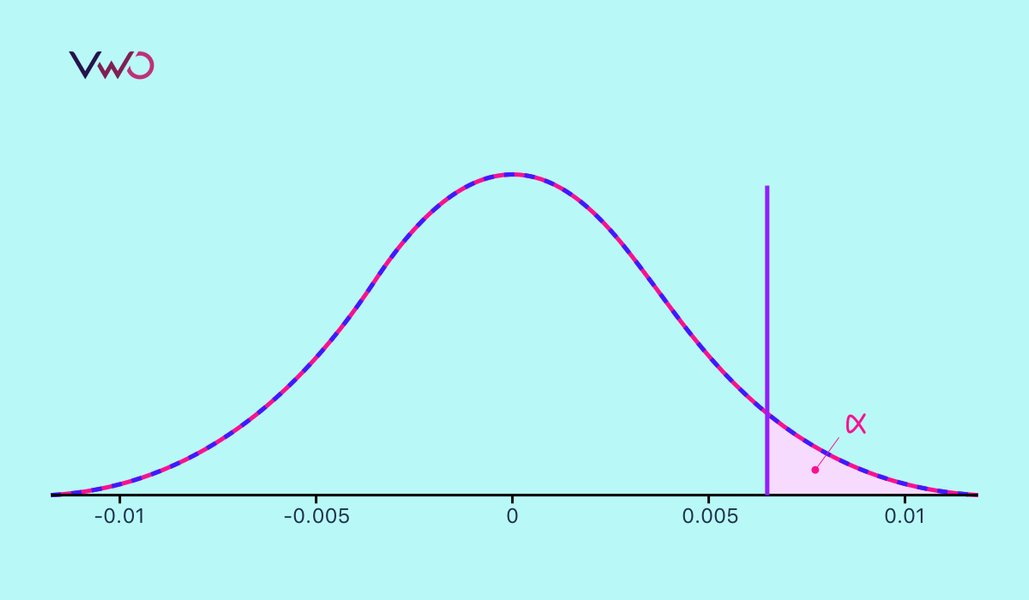
The graph above is taken from an excellent book called Statistical Rules of Thumb. Luckily, the chapter on estimating sample size is available to download freely [PDF]. Another excellent source to get more information on sample size estimation for A/B testing is Microsoft’s paper: Controlled Experiments on the Web: Survey and Practical Guide [PDF].

Hope you like the calculator and related resources. Excited to know your feedback and comments!

How Hyundai increased requests for test drive by 62% using multivariate testing

Hyundai, the Korean giant, not just makes well-engineered cars, they have well-engineered online strategy as well. In the Dutch market, they hired one our certified partners, Traffic4U to optimize conversion rate on their lead-generation pages. Traffic4u is an experienced, international online marketing agency, specializing in Result Driven Online Marketing and since they are our partners, they chose Visual Website optimizer for testing and optimization on Hyundai.nl

In this case study, we catch up with Janco Klijnstra from Traffic4U who talks about how they used Visual Website Optimizer for increasing conversion rate by 62% for Hyundai.

Case Study: using multivariate testing to increase conversions

Hyundai has landing pages for all of their car models where people can request for a test drive or download a brochure. These landing pages mainly get traffic from paid advertising campaigns (but get some direct and SEO traffic too). They wanted to make most from this traffic hence partnered with Traffic4U for conducting a multivariate test on all car model pages.

There were several goals for this test that they wanted to optimize:

  • Primary goal was a brochure request and/or request for a test drive
  • Secondary Goal was a clickthrough from the car page to the first step of the funnel
  • As a check engagement (inverse of bounce rate) was also measured

Why Multivariate Testing?

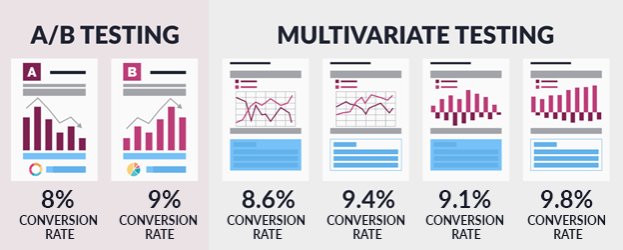
The main difference between A/B testing and multivariate testing is that in A/B testing variety of changes are done in a single variation while in multivariate testing, every change you make creates a new variation to be tested. So, multivariate testing is useful if you have multiple ideas to test on a page as it tells you exactly which changes impact your conversion rates and which don’t.

Hyundai’s car landing pages have a lot of different elements (car headline, car visuals, description, testimonials, etc.) so it was essential to setup a multivariate test in order to understand which elements influence a visitor’s decision to ask for a test drive or download a brochure.

What was tested?

Traffic4U setup a multivariate test and decided to create variations of following sections of the page:

  • New (SEO friendly) text versus control text: hypothesis was that if they change their normal text to SEO friendly text and it doesn’t impact conversion rate, they can permanently implement it for SEO benefits
  • Extra Call to action buttons versus no extra buttons: hypothesis was that extra call to action highlighted desired action
  • Large photo of the car versus thumbnails: hypothesis was that larger photo entices the visitor and also confirms the visitors initial goal that he/she is on the right page


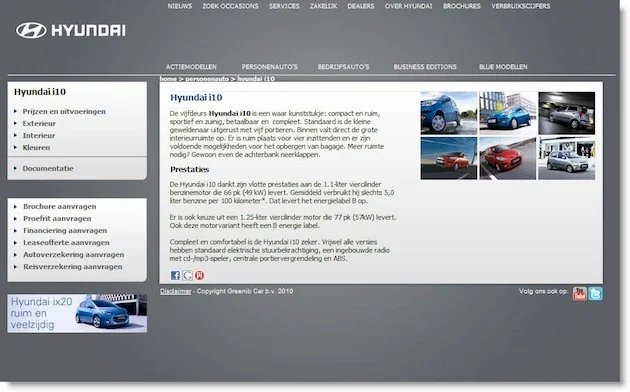
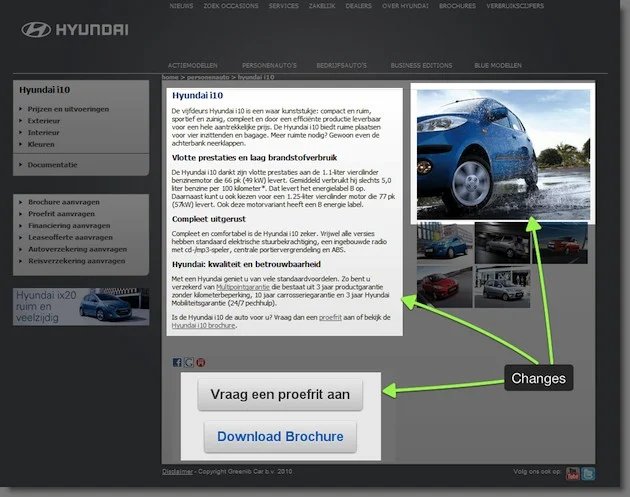
A total of 8 combinations (3 sections, 2 variations each = 2*2*2) were generated for this multivariate test. Here’s screenshot of the original page:

- Original page -

Results – which variation worked best?

The results of this multivariate test were phenomenal. One of those variations increased conversion rate (request for test drive or brochure) by 62%. And there was a staggering 208% increase in clickthrough rate (step 1 to step 2). Out of the total 8 combinations, can you guess which one increased conversions?

Well, the combination with SEO text, extra buttons and larger images did the wonder. It’s amazing how Traffic4U was spot on for all three changes. Here’s how the variation looked like:

- Winning variation (62% increase in leads) -

The results of this multivariate test are so phenomenal that it won a silver award in annual WhichTestWon awards!

Lessons learnt and value of Visual Website Optimizer

Traffic4U used lot of heuristics and best practices experience for coming up with variations for this test (larger pictures, clear call to action buttons, etc.). This test demonstrates that doing a proper multivariate test can validate those best practices. It may have been certainly possible that adding SEO text decreased conversions at the expense of extra traffic, however setting up a multivariate or A/B test can settle that dilemma easily.

When we asked Traffic4U about their comments on Visual Website Optimizer, here’s what they had to say:

Visual Website Optimizer was very valuable it made it possible for us as an agency to build our own variations, test on a group of pages and measures different goals at once. Also the Analytics plug-in was very helpful in the analysis for segmentation purposes.

This case study is an excellent example of how a large company (such as Hyundai) works with a specialized conversion rate optimization agency like Traffic4U to use multivariate testing for increasing business metrics such as test drive requests and brochure requests. If it worked for Hyundai, it can work for you too!

Signup for a free 30 day trial account of Visual Website Optimizer to easily setup multivariate tests on your website to increase sales and conversions.

Revenue Tracking for A/B testing: exciting new feature in Visual Website Optimizer

We are extremely proud to release a brand new feature in Visual Website Optimizer: Revenue Tracking. This is a significant new development for our product because it means now in addition to tracking conversion rate (for multiple goals such as clicks on links, visit to pages, form submissions, engagement, etc.), you can track various revenue metrics as well (including revenue per visitor, total revenue, average order value, etc.)

Why you should track revenue in your split tests?

Revenue tracking for A/B split tests is utmost important when a monetary transaction is involved (either immediately or at the end of conversion funnel) and a conversion goal may have different monetary values. In some cases, higher conversion rate may translate into lower revenue, so basing all decisions merely on conversion rate can lead you to choosing a variation that actually decreases your revenue.

Let’s imagine that a software / eCommerce company is running a split test on pricing page where (in a variation) lowest plan of $2o has been removed. For example, imagine running a test such as below:

If you just measure conversion rate, you can expect to see following results (lower conversion rate for variation since we removed smallest plan in it):

  • Control (original page): 1.2%
  • Variation (smallest plan removed): 0.8%


However, if you start measuring revenue for this split test, you can see that variation actually resulted in higher revenue per visitor:

  • Control (original page): 28 cents per visitor revenue and $1400 total revenue
  • Variation (smallest plan removed): 36 cents per visitor revenue and $1800 total revenue


Naturally, you would want to choose a variation which results in higher per visitor revenue even if total number of conversions and conversion rate decreases. That’s why revenue tracking is so important for A/B, split and multivariate tests. It lets you measure impact of your test variations on a metric that drives your business: revenue.

How to do Revenue Tracking in Visual Website Optimizer

We believe revenue tracking shouldn’t be hard and that’s why we have tried to make it dead-simple to implement it in Visual Website Optimizer. All you need to do is this:

  • Create A/B, split or multivariate test
  • On goals page, select ‘Revenue Tracking’ as goal and enter the URL of the goal as the page where you will have access to visitor’s revenue number (it is typically available on thank you page after a successful payment / transaction)
  • On that thank you page, you simply need to copy-paste default VWO code and output a JavaScript variable _vis_opt_revenue with value equal to total revenue generated by the visitor. For example, if the visitor purchased 2 items (one $15 and the other $7), simply output $22 in the variable. If visitor only bought one item (say $10), output $10 only. That’s it. You don’t have to be concerned about which variation visitor saw or what individual items did the visitor bought. You just need to output total revenue and Visual Website Optimizer will take care of the rest.


For example, if the page where we redirect after successful plan purchase is http://visualwebsiteoptimizer.com/thank-you.php then all we need to do is to copy-paste default VWO code there and also output following code:

<script>
    _vis_opt_revenue=49;
</script>

Of course, the value of revenue (49 in this case) will change dynamically depending on actual revenue generated by the visitor. If you already have revenue tracking setup with your web analytics tool (such as Google Analytics), extending it for Visual Website Optimizer should be a piece of cake. If not, just ask your IT guy, he would know where and how to output revenue for tracking. All in all, implementing revenue tracking in Visual Website Optimizer is quite simple.

How do Revenue Tracking reports look like?

Once revenue tracking is in place, you will see extensive reports like following:

As you can see, reports show you various metrics for different variations:

  • Revenue per visitor (the basic metric that determines performance of variation)
  • Total revenue
  • Total number of conversions (you can calculate average order value as Total Revenue / Total conversions)


Hope you like this new feature! Let us know if you need any help or assistance with revenue tracking in Visual Website Optimizer.

Landing Page Optimization webinar (30 minutes of recorded awesomeness)

We had an awesome webinar on landing page optimization yesterday where the team from Conversion Voodoo and GazeHawk analyzed 3 landing pages (chosen at random from a pool of 200+ submitted landing pages). Then I gave a quick demo of creating an A/B test on one of the chosen landing pages using Visual Website Optimizer.

Take a cup of coffee and bask in 30 minutes of pure conversion-rate-optimization awesomeness!

Hope you like the recorded webinar. Feel free to ask any questions on any of the points raised in webinar (simply leave a comment below).

Landing Page Best Practices: the definitive guide (with infographics)

We (at Visual Website Optimizer) are starting a series on the blog where the experts in A/B testing, landing pages, conversion rate optimization will share everything they know about how to increase sales and conversions online. If you know someone whom I can interview or want to contribute a guest post yourself, please shoot me an email at paras@wingify.com.

The first interview in this series is by Oli Gardner (@unbounce on Twitter), who is a Co-founder of Unbounce.com – the DIY Landing Page Platform. He created the Unbounce conversion blog to discuss a variety of marketing subjects such as landing pages, conversion centered design, social media conversion and ethical lead capture for business.

Editor’s Note: this interview is all about landing page best practices. Previously on this blog, I had analyzed 50+ landing pages and came up with some practical landing page optimization tips. After reading the interview, you may want to check out the post too.

Importance of Landing Pages

How important are landing pages for paid marketing? Why can’t a company simply redirect traffic to its homepage? What is the actual purpose of landing pages?

Landing pages are critical for any promotion specific marketing – but in particular for paid marketing where a measured ROI is essential to your success (and your ability to gain budgetary approval). The reason why you want to direct your paid traffic to a landing page vs. your homepage is that your homepage is often designed to be a generic entry point to your brand and business. It may contain references to many products or services – rendering the ability for a potential customer to find your intended conversion path amidst 40-70 links unlikely at best – impossible at worst. Which leads nicely into the third part of your question. The purpose of a landing page is to provide a hyper-focused experience that is designed to accomplish the singular conversion goal of your marketing campaign.

Usually landing pages look separate from main website (due to different design, userflow). Do you recommend this distinction between landing pages and main website?

I wouldn’t recommend making a stylistic or brand change to the design of your landing page. It’s important to keep it consistent with what your main website represents and what people have experienced in the past (brand memory).

The most elemental conversion principal is what’s known as message match. This is a two-way concept that applies to the information scent passing from ad to landing page (your Google AdWords ad talks about green apples, and so does your landing page), but it also applies to the next step in the conversion funnel, which is the visual brand connection from landing page to website. I’ll explain both of these a bit more.

If you are doing an ecommerce based “click through” landing page – designed to warm up the prospect’s interest in your offer before passing them on to your website/cart/registration page then you need to maintain “design match” where the visual and tonal brand guidelines are perpetuated on the destination site. If you don’t do this you risk a trust interruption which can cause people to bail.

For a lead gen landing page (often called a squeeze page – although I don’t really like the term or the negative segment of the industry typically associated with it) – the experience often ends on the landing page – which means the follow up experience isn’t quite as critical – but in the case of a big company – there will be a certain amount of brand memory where people expect a connection to their preconceived idea of how you present yourself. Again, without this design/brand match you can lose people.

Landing Page Best Practices

What are the most important characteristics of highly converting landing pages?

Focus. Simple and obvious writing. Clean design with an eye for contrast, whitespace and clarity. A clear call to action that describes what will happen when it’s clicked. Stick to those and you’re half way there.

If I had to distill it down to two points, I’d say a headline that you can read in 5 seconds and know what the page and offer is about and a brutally obvious cal to action (CTA). For some inspiration when designing your page to convert – read Designing for Conversion – 8 Visual Design Techniques to Focus Attention on Your Landing Pages.

If you are asked to fix only one thing in a badly performing landing page, what would it be?

That’s easy. The thing that was causing it to perform badly! Sadly, it’s not really that simple.

The thing to fix will most often be “message match” – this is the part that most people get wrong. You sell someone on a promise with your ad, then when they get to the page, the first thing they read/see represents a different story. So in a generic sense I’d say fix your message match and you’ll fix 80% of your problems.

But this is a bit of a trick question. What you need to do is spend some time walking in your customer’s shoes to understand what they are experiencing when they arrive at your page. Perhaps by trying a 5-second test.

Long vs. short controversy! How do you prevent making a landing page too sparse that users don’t get motivated or too long so users get distracted?

Long vs. short is a classic debate and one that can only be proven through A/B testing so I won’t harp on about any specific hypothesis here. Some higher priced items require more detail – but they also require more research – in which case a landing page may not suffice anyway. It depends on the page goal. If it’s lead gen – then you *must* provide enough incentive to complete the form – whether that’s a big long story or a sufficiently appropriate prize in exchange for the personal data.

Opinion on Landing Pages

What are your favorite landing pages on the web? (What about worst landing pages on the web?)

My favorite page (other than my own of course) tend to come from Webtrends. They just seem to nail it every time. #1 on this compilation and another great example here. Aside from them, Full Sail University does a consistently great job, particularly for lead gen.

Whatever is offered on a landing page (demo, trial, whitepaper, etc.), do you recommend putting it behind a small lead-gen form or should you give a direct link?

Yes and no. I personally think it’s something you need to mix up from time to time.

Make it Free. Sometimes it’s great to give away your expertise (particularly an ebook) without any barrier to entry. The goodwill marketing momentum you receive can be worth a lot more than a few leads. If you do this, just make sure you brand your ebook very well (every page should contain your logo and website URL) and a footer that states that you happily encourage the free sharing of your content. Many people don’t know if they should be sharing it without feeling guilty, and a lot of people suffer from guilt issues – so don’t let this prevent you from benefiting from your generosity. Also, there are a lot of old-school marketers out there who are STILL afraid to give content away (thtoopid, thtoopid) – thinking it should be copyrighted and protected and locked in a vault.

Ask for Data. If you are doing classic lead gen, then you are going to be giving something to your visitors in exchange for their personal information. The key here is to balance the size of the barrier (how much personal data you are asking for) with the size of the prize (what you are offering in return). A/B testing the length of your forms may point to an ideal form size to suit your needs. There are two kinds of barrier with forms – privacy and effort. Awkward or overly personal questions can put people off, or make them enter fake data (which helps no one), while super long forms just serve to make people sigh and hit the back button. If you must ask for a lot of information, make it worthwhile with a really valuable giveaway.

Editor’s note: That’s it for the interview! If you know someone whom I can interview or want to contribute a guest post yourself, please shoot me an email at paras@wingify.com. Also, as mentioned at the top of post, previously I had analyzed 50+ landing pages and came up with some practical landing page optimization tips. So, you may want to check out that post.

A/B testing for Joomla: plugin for Visual Website Optimizer

We already have A/B testing plugin for Wordpress and Drupal. Today we are proud to release a similar plugin for Joomla.

Split testing for Joomla without a single line of code

What’s the best thing about this plugin? Well, once you install this plugin on your Joomla site you can create unlimited number of A/B and multivariate tests (using Visual Website Optimizer) without requiring to modify a single line of code on your website. Watch a small video if you don’t believe that!

Installation Instructions

This plugin is made by Analytics for Joomla who make awesome plugins for Joomla.

  • Download the Joomla plugin for VWO
  • Upload plugin through Joomla administrator interface
  • Select the plugin in the extensions – plugin section
  • Enable plugin
  • Add your VWO account id (visible in Manage Account section in VWO)
  • That’s it! You are ready to create and run A/B tests on your website


For further details, visit Analytics For Joomla website to Download the plugin & read installation instructions. Or you can leave a comment if you need help.

Checkout page A/B testing: 3 dead-simple changes increased sales by 15%

The experience in the checkout flow is extremely important but quite fragile. Whenever visitors have taken the motivated action to “checkout” or “buy” they have already told you that they are ready, they are no longer using the shopping cart as a calculator to see how expensive it’s going to be. They WANT to buy your items now but why some of them end up abandoning the carts and not make a purchase? The simple answer is insecurity.

Here is how Optimeria (an agency specializing in conversion rate optimization) addressed the insecurity issues on Slideshop.com and drove a staggering +15% boost of conversions with only 3 changes on a single page.

The results of the test

Results were +15.05% conversion rate increase with a 98% statistical validity and 200+ conversions per treatment.

Original page v/s Variation

The test was a radical split test where they bundled multiple elements into one single treatment and put it to test against the control (original checkout page). Prior to constructing the variation page, they made use of an extensive range of conversion flow analysis and also used findings in other tests from the same client (see other case study: how left navigation menu increased conversions by 34% for an eCommerce website).

Original checkout page

Variation: 15% increase in sales

The checkout on Slideshop itself is a simplistic version of a normal checkout process because they sell a digitally downloadable product (Powerpoint presentations + elements). There are 3 simple steps in the overall process:

  • Enter email address
  • Choose payment option
  • Pay and download the product


They identified 3 main problems with the current “enter email” page (step 1 in checkout) and decided to address them hoping to decrease shopping cart abandonment.

Concern #1: Why are you asking for my email address?

As you surf over the Internet as a shopper, a lot of decisions are made from intuition. Your brain only asks you from time to time to justify a choice your subconscious had already made for you. So in many ways you are actually shopping on autopilot.

This autopilot does not like when things aren’t as expected. This specially true in checkout step because it is so close to making an actual payment. Therefore they needed to address the concern (on Slideshop checkout page) of asking for an email address without any explicit motivation. They also needed to tell WHY and WHAT the benefits of this transaction are (I give you my email address and you give me what?)

They addressed this particular issue by adding a value to the transaction (Send download to this email address) and stressed that email information would not be misused, sold or shared. They fulfilled the value to the customer in this exchange: I give you my email address and you give me a link for my download.

Concern #2: When I get through all this, what can I expect from your product / services?

No service is alike. There are always unique concerns that only apply to one business, product or service and in this case they already knew that one of the concerns of the customer was “How can I actually use your product once I’ve downloaded it“. They address this issue several key places in the website already, however they felt that adding it on checkout page at (a crucial moment in the decision making process) would help build up necessary motivation to follow through on the purchase.

Additionally, their thesis was that addressing the concern about what to do if a download is incomplete or gets deleted and making it clear that once purchased, the customer can always re-downloaded it would add to the motivation for completing the transaction.

They addressed both issues at a very center and prominent position just beneath the call to action to signal to the user that they know these concerns were there and that customers shouldn’t be worried about them.

Concern #3: OK, I will do the payment, but what if my credit card info is stolen?

When a call to action is as crucial as “continue to payment options” it’s also going to set in motion some common insecurities about the next transaction. Even though we all know that we aren’t going to be charged anything before filling in credit card details, we still don’t like the feeling of being in a situation where issues like “What kind of credit cards do you accept?” and “Is the transaction secure?” aren’t adressed before moving on to actual payment step.

You might think that it doesn’t matter as much because first step is not the actual payment page, however your users’ brains don’t make that distinction. They are already fast-forwarding to the payment situation where another decision is going to be made. At this point, they can subconsciously act on insecurities to avoid being put in a situation where it “feels wrong” and hence simply abandon the shopping cart.

They addressed this by adding following in the variation:

  • What kind of different credit cards are accepted
  • Trust seal by Verisign to ensure transaction will be safe
  • Known security items of the actual payment transaction (like PCI compliance, Verified by Visa, etc.)


All this to make the user at-ease with the current stage of the decision process.

What to learn from all this?

Well, even though some of these elements are unique for Slideshop and the market in which they operate, the learning from this case study is that it is crucial to address key concerns (conscious and subconscious ones) at the right stage in the decision process.

Karsten Lund is CEO of Optimeria, a Danish company which is a Visual Website Optimizer certified partner. He recently wrote about a case study (in Danish) where he managed to increase sales by 15% by optimizing checkout page. He used Visual Website Optimizer for A/B testing so on our request, he translated the case study in English and we published it above.

Get email updates (it's free)

Get email updates

Or subscribe blog via RSS


Search Blog


Latest Posts


Visual Website Optimizer


Latest Tweets Follow Wingify on Twitter

Follow Wingify on Twitter