



Landing Page Optimization tips: analysis of 50+ sites to find out what increases sales and conversions

Posted in A/B Split Testing, Multivariate Testing on November 2nd, 2010

Last week I offered free conversion rate optimization advice on a popular forum (known as Hacker News). Within a single day I got 50+ requests for help. It was definitely an enriching experience analyzing and dissecting all those websites and landing pages. As I was replying and providing my feedback to those 50+ sites, I started sensing a few common issues that affected conversion rates of all those pages. Without naming any specific URL or site, in this post I will detail where those sites lacked and what you can learn from my analysis to fix your homepage or landing page.

Four common issues with landing pages

According to my analysis, one of these four issues (if not all) were the most common causes of poor conversion rates. As you go through the list of issues below, try to relate them to your landing page (or homepage). Here are the four most common issues that affect conversion rate and sales:

  • Too-much text (without any apparent order and layout)
  • Headline that doesn’t tell what your product or service does (or, in other words, tangential headline)
  • Lack of a single prominent call-to-action (either there is none or there are too many)
  • Lack of social proof or ROI proof (who uses the service and what are the benefits)

Let’s analyze the issues one by one.

Issue #1: Too much text


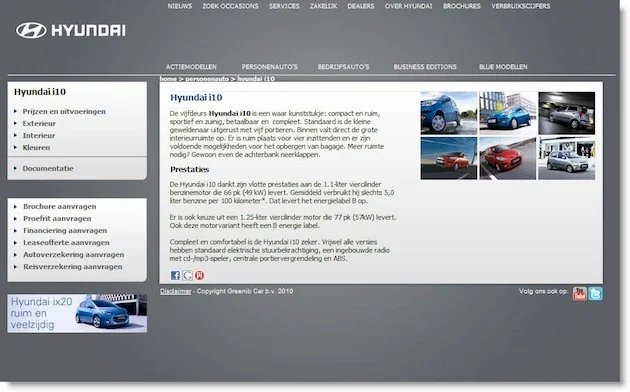
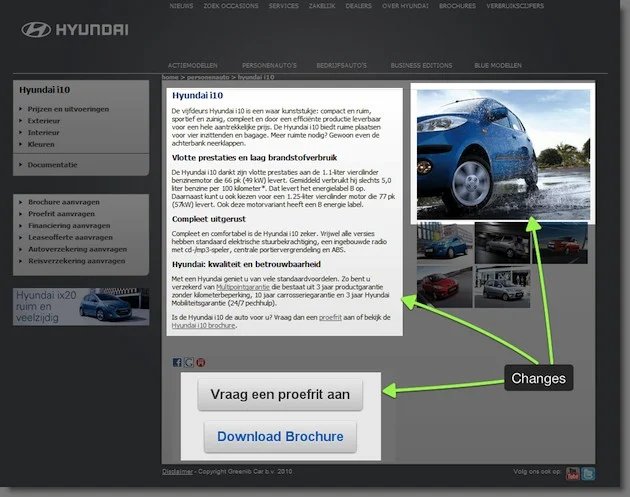
Example of a homepage with too much text

I won’t be surprised about lack of sales and conversions if your page announces “Welcome to..” followed by a bunch of three paragraphs describing what the site is about. Nobody on the web has patience to read paragraphs after paragraphs about you are offering.
On the web, people scan for elements that catch their eye. And you get only first few seconds to answer two most important questions: a) what you are offering; b) why they may need it.


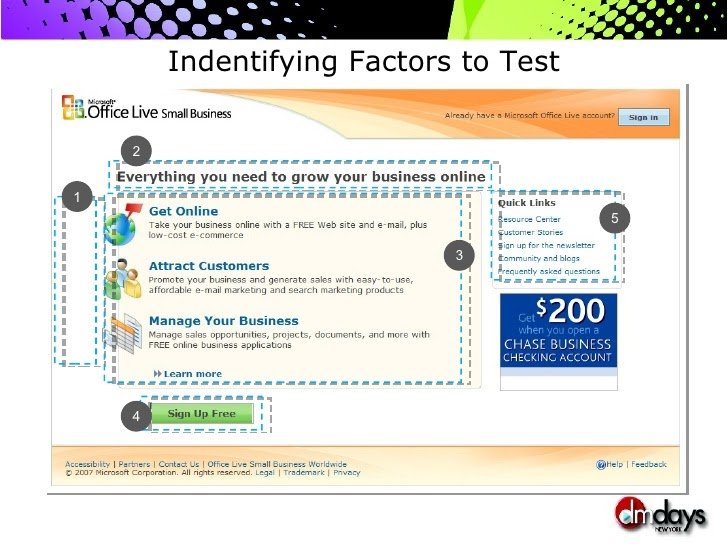
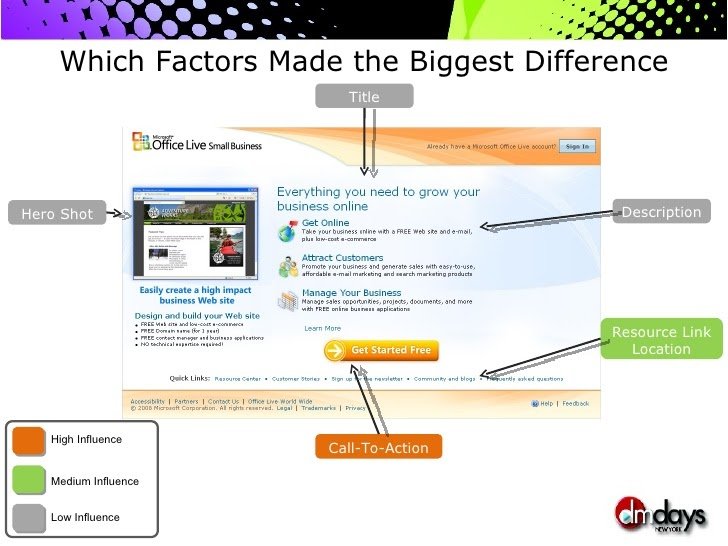
Example of a balanced webpage (text + images)

So, what you need is a proper balance between graphics and text. Some examples of how you can improve your landing page (by replacing some text):

  • Instead of extensive “How this works” (consisting of heaps of text), make a simple graphic detailing the process
  • Instead of writing “We make some of the best shoes in UK” followed by description of different kinds of shoes you make, show pictures of shoes you make
  • Instead of trying to stuff every piece of information from your site on one page, concentrate on a SINGLE objective (and replace most of the text by images, graphics, etc. – all neatly arranged).

Hiring a professional web designer will certainly help if you lack design skills. On a similar note, “visually appealing” pages are always seen as more credible than “crudely designed” pages. So, an investment in a good design will go a long way helping your sales and conversions.

Issue #2: Lack of descriptive headline


Example of confusing headline: “Changing how the world works”

As I hinted in the section above, visitors on your page are impatient. Within first 5 seconds, they want to know what your service does or you have lost a chance with him/her. As someone wise said: “Browser back button is your biggest enemy” (if you find the source of this quotation, please leave a comment). Never think that a visitor is going to spend minutes reading through all text on your page and then make his best guess of what you are offering. Instead, you should make the job easy for him. Have a big, bold descriptive headline as the first thing he should see.


Example of good headline: “Hire Online Workers to get the Job Done”

A descriptive headline also serves another important job: it *sticks* in the visitor’s brain as long as he stays on your website. Contrast this to the scenario where there is no helpful headline which a visitor can fall back on if your page gets too confusing (usually happens because we want to write about EVERY feature our site offers). Moreover, your visitor is usually distracted. Imagine a “busy-beaver” visitor chatting with friends on IM, doing a status update on Facebook/Twitter and on a call with his boss, all at once. Now imagine he stumbles on your website. Do you expect him to really understand what your site does without having a descriptive headline?

My advice is to avoid following kinds of headlines:

  • No-headline: no matter how bad it is, you should definitely have a headline of some kind
  • Visionary headline: avoid headlines such as “Welcome to the future of social media marketing”. Such headlines are usually vague and convey no information at all. And if you think it may excite visitors, read last section of this article (about social proof).
  • All focus on benefits: in the first version of Visual Website Optimizer homepage, we had a headline “Magical tool to convert visitors into customers”. While that headline tells about the benefits of the tool, it doesn’t talk about what the tool really is. So, we changed the headline to “World’s easiest A/B testing tool” and believe it is much better than the other one. (Can you come up with an even better one?)

In a nutshell, headlines should be short, concise and descriptive.

Issue #3: Lack of a single prominent call-to-action


Paradox of choice on a landing page. Out of three call-to-action buttons. which option to choose?

Call-to-action is a button or link that asks visitor to take a specific action. It may be a link to your signup form, plans and pricing page or the feature tour page. There are two specific issues related to call-to-action: a) either some sites don’t have any call to action button or b) some sites have too many call-to-action buttons. Once the visitor arrives on your page, thinks that you are credible (from your design), reads the descriptive headline and is finally convinced to spend some time on your site, what’s the next page you want him to see? That decision should not be left on visitor because only you know (and not him) which is the most relevant page that the visitor should be viewing next.


Example of single, prominent call-to-action: “Download WordPress”

If you don’t have a single call-to-action or have far too many call-to-action, visitor is likely to get confused what to next (since all links from your landing page/homepage seem to be of equal importance). Even if you have two prominent buttons (e.g. one of Learn More and other for the signup), try reducing it to one button. There is even a book titled: “Don’t make me think!” and that’s precisely the point I’m trying to make here. Don’t force your visitor to make a choice. By placing relevant call-to-action buttons on different pages of your site, you should gently guide him to the final goal (be it a signup, purchase, download, etc.)

Issue #4: Lack of social proof or ROI proof


Example of no social proof. Why should I bother about Twhirl?

So you make bold claims on your site. Of course, you think you are the “Best Twitter client ever”. But, unfortunately, making claims is easy. Any site can claim to be the “best” or “revolutionary” because those words are abstract. You may think your product is the best but if you are the only one in this world with that viewpoint, you are not going to convince anyone to try it out.

Humans crave for social proof. They want to know whole else is using this thing and how beneficial was it for them. Even if you design the most beautiful landing page but fail to include any social proof, your sales and conversions are going to suffer. Social proof can be shown in terms of testimonials, company logos, customer photos or case studies.


Example of social proof: we know Facebook, LA Times, etc. use Hootsuite. So it must be good, no?

It is understandable that if your site is just getting started, it may be hard to get any social proof because you may not have any customers. In that case, you need to have a convincing return-on-investment proof on your site. I’m not just talking about justifying investment of money but you also need to convince a visitor to invest time trying out your service or product. People crave for statistics and validation. So, you can perhaps do a small study or research on Internet to come up with metric of some kind highlighting usefulness of your service. (Example if you have a new social media monitoring service: 95% of business are talked about on the Internet, use MyShinyNewTool to talk to those invisible customers).

Another key point with regards to social proof is human emotions. People respond to concrete representations (say a customer video testimonial) in a much engaging way as compared to an abstract fact (say, 50+ companies from Life Sciences and Biotechnology industry use our software). This is not to say that facts in your social proof don’t work. They do. But you can always augment them with stories of individual customers and what your service did to them. (Case studies are a great way about doing that).

Conclusion

To re-iterate, if you want to increase sales and conversions on your landing page or homepage, you need to concentrate on fixing following issues:

  • Too-much text (without any apparent order and layout)
  • Headline that doesn’t tell what your product or service does (or, in other words, tangential headline)
  • Lack of a single prominent call-to-action (either there is none or there are too many)
  • Lack of social proof or ROI proof (who uses the service and what are the benefits)

We also have a FREE automated diagnostic tool, called Landing Page Analyzer, which will point these (and many more) deficiencies on your page. Click here to start analyzing your landing pages.

65 Comments »

Impact of A/B testing on Search Engine Optimization (SEO)

Posted in A/B Split Testing, Multivariate Testing on October 7th, 2010

Update: there is even an official confirmation from Google’s Matt Cutts that split testing does not impact search rankings.

A lot of our potential customers are concerned whether A/B or multivariate testing will have an effect on their search engine rankings. They (obviously) aren’t looking to improve their rankings by using A/B testing, rather their concerns relate to the myth that testing may negatively impact search engine optimization efforts.

Broadly, there mainly two major concerns:

  • Content Cloaking: the act of showing different content to search engine bots and actual human visitors. A/B testing software (such as Visual Website Optimizer) swap content on the page using JavaScript, so some users see different content (of variations) and bots see original page only.
  • Duplicate Content: the act of copying content from elsewhere and hosting it on your site. Search engines penalize for such stealing of content because you cannot expect to rank on keywords for the content that isn’t yours. Again, many A/B and multivariate testing software (including VWO) have an option where you can redirect site traffic to different variations of a page which raises this concern.

Why A/B testing is not content cloaking

Cloaking content was all rage back in the early days of search engines (think 1990s). In those days, SEO was all about keyword stuffing. So, smart SEO geeks used to display a page full of keywords when a search engine bot visited to crawl / index the page. While if a user visited the same page, they displayed the default (normal) version. This strategy of keyword stuffing used to work like wonders so naturally search engines started devising clever ways to detect and penalize such cloaking and it may appear that pages where A/B testing is on will also get penalized because it is kind of cloaking.

Good news is that thanks to Google’s PageRank algorithm, keyword stuffing no longer works. So, there is little incentive for search engines to penalize content cloaking. Moreover, unlike yesteryears’ static HTML sites, today’s search engines have come to expect highly dynamic AJAX driven sites. So, they no longer consider swapping content dynamically as cloaking. If you use a multivariate testing software to swap different parts of your page, it is not cloaking! Also, all the major search engines (Google, Yahoo, Bing, etc.) are well versed with concept of A/B split testing and they do many such tests on their own sites every single day. You wouldn’t expect search engines to penalize others for doing the same activity that they themselves do regularly, would you?

Key lesson: Doing A/B testing by dynamically swapping elements on page (using JavaScript) is NOT content cloaking. It is absolutely safe and should not have any negative impact on Search Engine Optimization efforts.

Split URL testing (redirecting traffic to multiple versions) and the issue of content duplication

As I mentioned above, this is another issue that worries many prospective customers. While one approach for split testing is to dynamically swap page elements (such as headlines, images, text, etc.), another approach is to host different variations of page on your website. So, if you want to split test product.html, you will create variation pages and host them as product1.html, product2.html, etc. A split testing software will redirect all traffic coming to product.html to the variation pages. Since product1.html and product2.html will have similar content as product.html, it worries some people that search engines will consider them duplicate content and penalize rankings.

An important point to note here is that search engines only penalize if you steal or host content from a different domain; here all variations pages host on your own site and you OWN that content and are free to do with it whatever you want to. Many dynamic websites (shopping carts, directories, etc.) today host the same content in different formats. Search engines don’t penalize them because that unique content is only found on their domain and no where else. Same is the case with your split testing URLs. You don’t get negatively impacted by it because you haven’t stolen that content — it is all yours!

A more important point is answer to this question: how will search engines come to know that there are different variations of your main page? Your variation pages can only be reached if there is a link pointing to it. Since you don’t link to your variation pages from anywhere from the site or else-where, search engines won’t know that those pages even exist. For the truly paranoid, you can instruct search engines not to index you variations pages. You can do it either using no-index meta attribute or by using robots.txt

Lesson: A/B split testing has absolutely NO negative impact on your SEO efforts!

Rest assured, you can use Visual Website Optimizer without worrying about its impact on search engine rankings. If you have a specific SEO and A/B testing related question, let me know in comments below.

14 Comments »

A/B testing significance calculator (spreadsheet in Excel)

Posted in A/B Split Testing, How To, Multivariate Testing on September 27th, 2010

The statistics of A/B testing results can be confusing unless you know exact formulas. Earlier, we had published articles related to mathematics of A/B testing and also have a free A/B testing calculator on the site to see if your results are significant or not. The articles provides an introduction and calculator simply provides an interface; the real formulas used for calculate statistical significance of split testing results are still missing.

Excel sheet with A/B testing formulas

So, we have come up with a FREE spreadsheet which details how exactly the significance is calculated. You just need to provide e thnumber of visitors and conversions for control and variations. The spreadsheet will automatically calculate for you significance, p-value, z-value and other relevant metrics for any kind of split testing (including Adwords). Of course, you can see the relevant formulas in the spreadsheet. Click the screenshot below to download the calculator (spreadsheet):

Click here to download A/B testing significance calculator (excel sheet)

Please feel free to share the file with your friends and colleagues or post it on your blog / twitter.

PS: By the way, if you want to do quick calculations, we have a version of this calculator hosted on Google Docs (please make a copy of the Google Doc sheet into your own account before you make any changes to it).

29 Comments »

Rules-of-thumb for A/B and Multivariate tests

Posted in A/B Split Testing, Multivariate Testing on September 20th, 2010

I recently got interviewed on Unbounce blog as a conversion hero. In the interview, I shared few rules-of-thumb related to A/B and multivariate testing which you may find helpful. I developed these heuristics while observing and advising hundreds of tests created by Visual Website Optimizer users. So, in this post I will paraphrase and expand on some of the things I shared in the interview.

A/B or Multivariate, which test methodology to choose?

Three main criteria will help you in choosing the right methodology between A/B testing or Multivariate testing:

  • Traffic on test page: MVT requires lots of traffic to get any significant results
  • Design resources available: MVT requires less number of design resources
  • Objectives of the test: MVT is used for optimizing existing design and A/B test is used for optimizing conversions by testing a completely new design

Quoting from the interview, here is an elaboration on these three factors:

The eligibility criteria for each method is traffic of course. You should not attempt to do MVT if you don’t have enough traffic on the site. But assuming traffic isn’t a constraint, MVT works best when you are hyper-optimizing. That is, when your aim is to squeeze the last drop of conversion rate juice from your existing design. On the other hand, A/B testing should be used if you want to test completely different designs and ideas. Ideally, an organization should do lots of MVT tests followed by a few large A/B tests.

MVT typically requires less design resources as compared to large scale A/B test changes. Moreover, as I said, if the objective is to optimizing existing design MVT (or single element change) is way to go. But if you want to do radical changes on the page (say layout change, theme change, etc.) you will go with A/B testing.

Best methodology to start with?

Undoubtedly, if you are just getting started with testing and conversion rate optimization, you should go ahead with a simple A/B test. Multivariate testing is a complex methodology and it is easy to draw erroneous conclusions. From the interview:

For the starters, I always recommend to start with small-step changes in order to truly appreciate the value of testing. Ideally, they should pick a sweet spot on their page (ideal candidates: call-to-action, headline and image) and optimize that by a simple A/B test. Only once they get the hang of the whole process, they should attempt MVT or large-scale A/B test.

What to test and what not to?

Of course, what you test on a page depends on the specific site and objectives of the test. But if you are looking for some rules-of-thumb on what are the most common elements on a page that can be tested, here are they:

  • The King: Call-to-Action (your main button)
  • The Queen: Headline
  • Others: text copy, images, number of form fields, number of steps in funnel, required vs. optional steps, number of elements on page, amount of text on page, layout (left vs. right kind of tests)

As far as what not to test is concerned, it is best to avoid testing:

  • Pricing: very risky, and potentially illegal. You shouldn’t offer the exact same service/product at different price-points.
  • Trivial elements on site: every element being tested on a page should have a hypothesis on why you are including in the test. For example, without a specific reason, you shouldn’t add page elements (say a footer or header) in the test and expect conversion rate to improve magically! You need to be convinced that a particular site element has high chances of impacting conversion rate.

What kind of surprises can you expect while doing A/B testing?

Technically no winning variation in a test should be seen as a surprise because there had to be a specific hypothesis on why you included it in the test. Nevertheless sometimes one finds that the test results are contrary to what was expected. That is, a variation won hands-down when one such expected it to lose significantly (or vice versa). Here are a few (real-world) examples of such surprises:

A recent test was very surprising – in this test it was found out that removing a secure icon from the page actually increased conversions by 400%. Another surprising result was that by simply adding a human photo on a homepage, conversion rate can be potentially doubled.

One of the test results on our homepage goes really against the standard advice of having a ‘Signup’ button prominently features on homepage. We found that a ‘Signup’ button actually decreased eventual sign-up’s and ‘Watch a short video’ worked much better because after watching the video, visitors were sure of what they are signing up for. (We had a ‘Signup’ button on the video page, by the way).

I hope you liked the interview snippets. If you want to read the full interview, head over to Conversion Heroes Part 3: Split Testing – An Interview with Paras Chopra.

1 Comment »

Server-side A/B testing using phpA/B: what is it and why should you care

Posted in A/B Split Testing, Multivariate Testing on August 11th, 2010

Most A/B testing solutions, including Visual Website Optimizer, fall into a category known as client-side testing. What “client-side” means is that a variation of your test page is created (before displaying to the visitor) by doing manipulations on the browser using clever JavaScript. Your web server always sends the same default version of the page as it would normally do. Since the changes needed to display a variation happen on visitor browser (and not your server), this technology is called “client-side”.

There is another breed of testing frameworks known as “server-side” A/B testing. Using such frameworks, no modification happens on browser level. In fact, when the browser requests your page, a randomly picked version of your test page is sent from your server. While this means you need to involve your developers for implementing changes in your website code, it does give you unlimited flexibility of testing.

The server-side A/B testing framework for PHP that we officially support is (unsurprisingly) called phpA/B . It’s free to use (for personal websites). If you know PHP, see the documentation for this library. Just as VWO appeals to marketers because it lets them do A/B testing without making any code changes, we are sure phpA/B will appeal to developers who prefer to dive into code. The library provides integration with Google Analytics out-of-the-box. It also filters out all bots and shows them your control page so that it doesn’t affect your SEO efforts. If you are a Ruby on Rails developer, you may be interested in A/Bingo or Vanity.

Why are we supporting server-side testing frameworks? Aren’t they in competition with us? Not really! Our focus with Visual Website Optimizer is to make A/B and multivariate testing easier by taking technical hassles out of the picture. In fact, ideally, we want our users never to touch any code (be it HTML, JavaScript, CSS or PHP). So, VWO is suited for people who don’t want to rely on developers or IT team for doing even the simplest kind of testing (thereby lengthening the time involved in getting the test up and running).

On the other hand, server-side testing frameworks such as phpA/B are better suited to companies which want to tightly integrate A/B testing in their development process. This is in line with the upcoming “lean-startup” or “test-driven-development” scene.

Different companies, different needs, different A/B testing solutions! We hope you find the best fit for your needs.

2 Comments »

How to create an A/B split test in 2 minutes [video]

Posted in A/B Split Testing, Multivariate Testing on June 28th, 2010

We recently revamped the introductory video for Visual Website Optimizer by adding a voice-over and updating it by including some new features (e.g. heatmaps).

From start (entering the test page URL) to end (interpreting test results), all it takes to run your first A/B test is just 2 minutes. And you thought testing is a dark art? ;) Watch the video below:


Do you think video can be improved? Please leave a comment to let us know what can we add, remove or change to make A/B testing using Visual Website Optimizer even more exciting.

No Comments »

A/B Testing + Clickmaps = Awesomeness

Posted in Multivariate Testing, News on June 2nd, 2010

Do you know where visitors are clicking on your website homepage? Do you know which parts of your website are hotspots that attract visitor attention? You can, of course, fire up your web analytics tool and tell me that 20% visitors go to sign up page after visiting homepage but that information doesn’t tell you the whole story.

First, some stats about Visual Website Optimizer homepage: 30% of visitors who come to homepage visit the sign up page too. Of course, this figure is unsurprising because we have a giant Sign up for FREE 30 day trial button right in the middle. So, a lot of visitors must be clicking on it to arrive on the sign up page?

That is what we believed all the while. In Visual Website Optimizer, we had recently released an experimental feature called clickmaps & heatmaps. Clickmaps provide complete click statistics on the web pages for different test variations. Heatmaps help in visualizing hotspots on your webpages where most clicks happen.

Continuing with the story of our homepage, here is a screenshot of heatmap of our homepage:

Can you see the hotspot over tiny Pricing link in the top navigation bar? To know exact statistics, we turn to clickmap of the homepage:

We were completely thrown off our chairs when we realized that 25% of the clicks on the page happen on that tiny link, while the giant Sign up for FREE Trial only gets 5% of the clicks. Moral of the story: the button isn’t playing as important role as we imagined. So, what we now replaced the Sign up button on homepage with Watch a short video button because any way visitors interested in signing up are clicking on Pricing link.

A/B testing and Clickmaps combined

The power of clickmaps & heatmaps increases ten-fold when you combine it with A/B testing. For example, if we replace Pricing link with Free Trial – will it generate a similar distribution of clicks? What if we replace navigation bar from left to the right? What if we change the text of the big button from Sign up for Free Trial to Plans & Pricing? All these are interesting scenarios and we plan to test them one by one.

Recently we completed an A/B test where we tested homepage against a simple page with a text box allowing visitor to do a live demo of the tool on his/her website. While the test results weren’t conclusive, the heatmap provided interesting insights:

The clicks were evenly distributed on different links and elements. Another surprising statistic was that in this variation about 10% clicks happened on Home link in the navigation bar as compared to 2% in our default homepage. This shows that because of the text box a lot of visitors thought that they weren’t on the homepage and tried to go to a page which provides more information.

The qualitative results produced by clickmaps and heatmaps complement quantitative A/B test results such as the one in screenshot below (not related to our homepage test):

The combination of A/B test and clickmaps is a lethal one! Being able to visualize click activity for your different variations gives you tons of ideas and insights beyond what can be captured in hard statistics.

Login to your Visual Website Optimizer account or sign up for a free 30 day trial to let us know if you find the new feature useful. Eagerly waiting for your comments! :)

PS: You can, of course, produce clickmaps and heatmaps for your website without needing to create an A/B test.

9 Comments »

3 controversial A/B testing tips that you may not agree with

Posted in A/B Split Testing, Multivariate Testing on May 11th, 2010

There are tons of A/B testing articles on the Internet. In fact, Visual Website Optimizer blog is full of them. But let’s admit it, all those guides, tips, tricks ultimately start sounding similar to each other. I decided to write a post on tips that do not have a straightforward logic and are not popularly discussed on the Internet. In fact, people usually do the opposite of what I am going to discuss in this post.

Don’t announce to the world that you are doing an A/B test


I won’t paste links here but a quick search on Twitter will confirm that people love raving about the A/B test they are currently running. You should absolutely not do this. Apart from having no real benefit, you can actually skew your results big time. With an A/B test, you want to determine how well variations work on your usual website traffic. Normal site visitors and curious visitors looking for your new test are very different in their behavior – you don’t want to bias your results with non-conversions of all visitors whose motive is to actually see what is being A/B tested.

Don’t launch your A/B test if you are expecting some heavy publicity


If you are expecting a spike in traffic, it is best to avoid testing because: a) majority of visitors in the traffic spike will not be like your typical website visitors so they are usually going to bias your results in a big way. Imagine for a moment that you are observing a 20% increase in conversions with variation A as compared to control. Now TechCrunch covers you and sends you bootloads of traffic. This traffic is known to be come-and-go type. So, your overall conversions will go down. Agreed that conversions will go down for all variations, however the difference between performance of variations will narrow down. If variation A was beating control by 20% earlier, after the traffic spike it will be down to 10% or so for no good reason. So, consider pausing your tests if you expect some major publicity.

Optimize for average conversion rate even while the test is running


A/B testing purists may disagree that you should set the test once and then let it complete, but I say you should definitely keep an eye while the test is running. Of course, the primary aim of the test is to ultimately increasing site conversion rate. But you don’t want to wait till the end and realize that you have lost many sales during the testing period. Consider disabling poorly performing variations and making variants of best performing ones in order to increase conversion rate even the test is running.

Those were 3 A/B testing tips. If you have any controversial A/B testing tip to share, do leave a comment here.

No Comments »

Optimization v/s Validation – two distinct uses of A/B testing

Posted in A/B Split Testing, Multivariate Testing on April 28th, 2010

It is a myth that A/B testing can only be used for optimization and you need to fully establish a process optimizing it. In other words, many people think that A/B testing is best meant for big guys who already have an established conversion funnel, and now want to squeeze an extra 0.01% out of it. As a natural consequence to this logic, it may appear that A/B testing cannot be used at initial stages of a project (or startup) because there is nothing to optimize yet.

Wrong. There are actually two distinct uses of A/B testing: a) optimization; b) validation.

How to use A/B testing for Optimization?

As mentioned in the opening paragraph, this is the activity with which A/B testing is usually associated. Typical scenario: you are running an advertising campaign where you collect leads. You get 10 leads for every 100 visits and you realize at this conversion rate (10%), this activity isn’t profitable. So, you set out to optimize (or increase) the conversion rate. You test headline, product image, form length and a bazzilion different page elements. In the end, you manage to increase the conversion rate to 15%. Well done!

As you can see, with this A/B test, the objective was clear: optimize conversion rate for the activity one is currently doing. There are several Visual Website Optimizer case studies where the tool was used for optimization. Examples include increasing sales by 20% by testing page design and increasing sales by 6.3% by testing Buy Now button.

How to use A/B testing for Validation?

Unlike above where we answer what is the best way to do an activity, in this case A/B testing is used to answer which activity to do in the first place. Validation means coming up with different possibilities and testing which one works best. Typical scenario: you decide to publish a new whitepaper for gathering leads. However, you are unsure which whitepaper will be most interesting to your customers. To answer that question, you make 5 different landing pages for each whitepaper and setup an A/B test. After the test is over, you check which whitepaper garnered most interest (via pre-release signups or some other conversion metric). Notice that you aren’t optimizing the lead collection process here, rather you are testing which whitepaper will potentially collect most leads.

To give you some examples, there are several Visual Website Optimizer case studies where validation was carried out. Here is how a startup validated its positioning and here is how the appropriate position for a promotional message was tested.

Key Lesson

A/B testing isn’t just for big corporations who want to optimize the last drop out of their conversions. In fact, A/B testing is more useful at answering business questions. Want to know which product to launch next? Which feature to develop? Which new market to enter? A/B test it today!

What is your opinion about this? Did you ever use A/B test for validation, instead of optimization?

No Comments »

How RIPT Apparel increased their sales by 6.3% using Visual Website Optimizer

Posted in A/B Split Testing, Case Studies, Multivariate Testing on April 1st, 2010

RIPT Apparel is a Chicago-based online retailer of one-of-a-kind designer tees and wearable art. They sell one new design by a new artist every day starting at midnight CST for $10 and it is only available for a period of 24 hours. After that period, the design rests in peace forever in the T-shirt graveyard and a new one takes over its place. The sense of urgency created by limited availability of the design can be used effectively to drive sales and that is what RIPT Apparel did in their first A/B test.

They had never done A/B testing before but were intrigued by the concept and wanted to give it a shot. The tool they selected for this purpose was Visual Website Optimizer. They tested their current buy button against a new buy button to determine which would have the best conversion rate. The conversion rate here being sales of their T-shirts.

The following is their control version (or default). Observe that the button isn’t the first thing to catch your attention as it blends well into the overall color scheme.


Original Version

They saw an opportunity for improvement, so they replaced their existing button with an attention-grabbing button with a different color scheme (green). See version A of the button below:


Version A – Control

Much to their surprise, they immediately saw a rise in sales. Ideally, they should have A/B tested the new version against the old but this was their first time and as you will read further they did a great job overall. Encouraged by the results, they went ahead and created another variation of the button. This time they decided to emphasize on the tactic that they should have used all along: emphasizing “limited 24-hour availability”. It has been demonstrated again and again that a sense of urgency drives up the conversion rate and this time too it proved to work best. Following version (B) of the button increased their site sales by 6.3% (notice only the button was changed – no new offers, no new products, no new policies).


Version B – 6.3% increase in sales

Pause for a moment and think what really happened in this case study. Someone (RIPT Apparel) with no previous experience in the field decides to A/B test, spends time researching what could work better, designs button variations, uses Visual Website Optimizer and sees a 6.3% rise in sales. No gimmicks, no new offers, no change in company strategy. Simply testing of sensible better variations of buy now button.

That 6.3% rise in sales will be hopefully permanent, so this one time effort would pay back RIPT Apparel many times over for time to come. Here is what they had to say after the test ended:

“According to Visual Website Optimizer we found our conversion rate improved a whopping +6.3%! We were astonished by this result. We had no idea that changing one button could result in an increase in sales and have that much of an impact. We wish we found this tool much earlier. “

It is important not to forget the role of the tool here. Visual Website Optimizer has been designed with a sole focus on ease of use, while avoiding technical hassles as much as possible. When we asked about the role of the tool in their first A/B test, RIPT Apparel said:

“The sales we have seen since changing and experimenting with our buy button have proven Visual Website Optimizer invaluable. I had some issues setting it up due to our shopping cart system and the team at Visual Website Optimizer walked me through step by step in order to set it up correctly.

As a result of this test I was able to go back to my partners and show them the results, which they were very happy with. Version B. is now live on our site and sales continue to rise.”

A great thing about tasting success with A/B testing is that it pumps you up to do even more A/B testing. So, RIPT Apparel are all set for their next phase of testing:

“We learned to test and test often. We think now that this test is over, we are going to try and test a few different color options, maybe even try some wording choices for our buy button.”

RIPT Apparel is a great company that successfully proved that A/B testing is not something that only Fortune 500 companies can do. Even small-medium sized online business can optimize and increase their sales by not mistaking A/B testing as a hyped-up fad. A/B testing works and it is addictive; one simply needs to try it at least once.

By the way, you should check out RIPT Apparel’s T-shirts – they are really quite cool!

14 Comments »

Stay up to date

Latest Posts

Latest Tweets

Send us a message, quickly!

Your Name

Your Email

Your Message

Or, contact us through email info@wingify.com