Ecommerce website? Bring price and add-to-cart button closer to increase sales

Posted in A/B Split Testing, Case Studies on June 8th, 2011

All ecommerce website owners know how important the add-to-cart button is. They would do anything to have a visitor click on that button because that’s where the actual sales process starts. Because of its importance, many eCommerce retailers start A/B testing variations of that button to improve click through rate. That’s precisely what Trinity Insight, a Visual Website Optimizer customer did for their client: Taylor Gifts.

Trinity Insight is a leading eCommerce consultancy that has helped numerous clients increase conversion rate. (They are also one of our certified agencies). We interviewed Nate Ende of Trinity Insight to talk about the A/B test they recently did to improve add-to-cart clickthrough.

What was the conversion goal of the test?

The premise of this test was to try to improve on the add-to-cart goal of the product page (of TaylorGifts.com).

On which page did you run the test?

The dynamic product page. Here’s an example. (Editor’s note: they used Visual Website Optimizer’s advanced mode to create a test that runs across thousands of dynamic product pages on TaylorGifts.com)

Which part of page did you select for the test and what variations did you test?

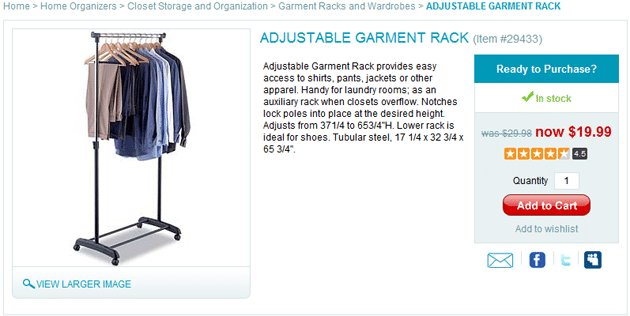
Here’s what the original product page looked like:
Original product page

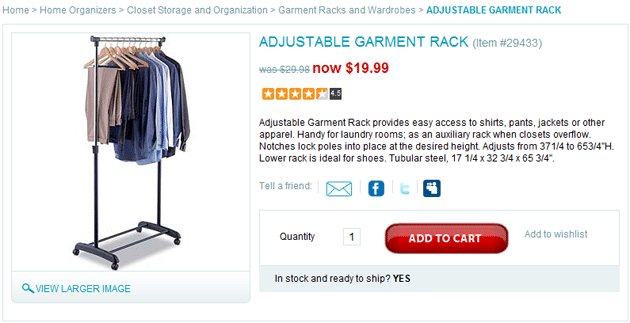
We ran an A/B split test, however we focused mainly on created a buy box with all of the information relevant to the buying decision located in close proximity of the add to cart action. Here’s the variation we tested:

Variation product page (10% increase in clickthroughs)

Why did you think that the variations you created had better chances to beat the original? What were you actually testing in this test?

We felt that presenting this information could help people find the information they needed to make a decision faster and in a more convenient location therefore making them more likely to place the item in their cart.

What results did you get? Were you surprised by the results?

We experienced a 10% lift in the goal conversion on this page and the overall eCommerce conversion rate of the test subjects went from 1.53% on the control to 3.23% on the variation. Needless to say, our client is very happy with the result!

Any lessons which can be derived from your test?

  • Placing the standard information we all use to make buying decisions in one easy to scan location makes a lot of sense from a sales standpoint. In traditional retail, ideally, a salesperson would be in close proximity of the item to answer questions about how much it is, and if it’s on sale how much you’re saving. They’d also let you know what other customers thought as so often we use our peers to help us make our decisions.
  • Providing valuable eCommerce information near this box may also be a good idea as in how long will it take to get to me and what do I do if I have to return it. More detailed information is great on the page for people looking to make in depth research-based purchases, but the segment of customers who prefer to move quickly through this process will find lots of value in an efficient buy box strategy.

How valuable was Visual Website Optimizer for this test?

VWO was irreplaceable in this test as we’ve done dynamic template tests like this in the past with Google WO and spent an inordinate amount of time creating a custom javaScript and would then need to work with the clients IT team to implement on their site whereas we were able to accomplish the same test with VWO all from within the administration area.

Paras Chopra

CEO and Founder of Wingify by the day, startups, marketing and analytics enthusiast by the afternoon, and a nihilist philosopher/writer by the evening!


Tags

14 Comments

[...] the information related to the product without regard for grouping together related information. For instance, price and buy button should always be close together for optimal conversion. Also check if the add-to-cart button stands out at all. It should be the most easily noticeable / [...]

Michael Kjeldsen
June 9, 2011

Excellent case study :-)

What I’d loke to know is, what if you changed the “Add to Cart” text to something less “hard”, e.g. “I want one of those” or ” Get this” or whatnot (lousy examples, I know, but I’m tired and you catch my drift :-)

Chief Conversionista
June 10, 2011

This article covers two out of three of the “Three Ps of a Perfect Product Page” as I wrote about earlier on the unbounce blog: http://unbounce.com/conversion-rate-optimization/product-pages-that-convert/
Happy to see that there other people on this track too ;-)

Paras Chopra
June 10, 2011

@John: thanks for dropping by. Your article is great! How about one guest post on our blog too? :)

Mo
June 10, 2011

On question, can you measure the add-to-cart rate with Google Analytics?

Paras Chopra
June 10, 2011

@Mo: I guess you can do that using event tracking feature of GA.

Mo
June 10, 2011

@Paras: That is very much true. Wonder why I didn’t think of that. TY! :)

jesse
June 11, 2011

For a great webshop go and try http://www.csswebdesigner.com it’s designed for designers.

jesse
June 11, 2011

Sorry wrong link it should be.

For a great webshop go and try http://www.csswebbuilder.com it’s designed for designers. LOL

matt
June 13, 2011

how about stop spamming your links jesse?

[...] the information related to the product without regard for grouping together related information. For instance, price and buy button should always be close together for optimal conversion. Also check if the add-to-cart button stands out at all. It should be the most easily noticeable / [...]

[...] Ecommerce website? Bring price and add-to-cart button closer to increase sales – Visual Website Optimizer Some A/B testing results on button positioning for an online store. [...]

[...] 1. Ecommerce website? Bring price and add-to-cart button closer to increase sales [...]

[...] Visual Website Optimizer. That’s it! No more painful changes in website code to get a simple Add-to-cart button test [...]

Sorry, the comment form is closed at this time. To start a discussion, please email info@wingify.com.

RSS feed for comments on this post.

I ♥ Split Testing Blog


Stay up to date

Latest Posts

Latest Tweets

Write for this blog!

We accept high quality articles related to A/B testing and online marketing. Send your proposals to contribute@wingify.com

Contact us for more information!

Your Name

Your Email

Your Message

Or, contact us through email info@wingify.com