Removing product filter on eCommerce website boosts site engagement by 27%

Posted in A/B Split Testing, Case Studies on July 18th, 2012

Click on “Play” button below to start the awesome presentation; best viewed in fullscreen mode


Back in February 2012, we published a case study on how adding a product filter to an eCommerce website affects revenues. Buyakilt.com A/B tested the inclusion of a filter on their product pages, allowing visitors to “slice and dice” through all the options available and quickly arrive at what they wanted to buy, helping the website increase revenues by a whopping 76%.

Today we’ve got a case for you which shows how benefits can be accrued by removing the product filter. Although filters are found all over the web and are almost de-rigueur for eCommerce websites, the folks at UKToolCentre theorized that for this specific category (a brand of woodcare products called Cuprinol), the filter menu was unnecessarily adding extra options to the page which wasn’t required.

Here is the page they conducted the test on. It had a filter menu for all products just above the Cuprinol listing.
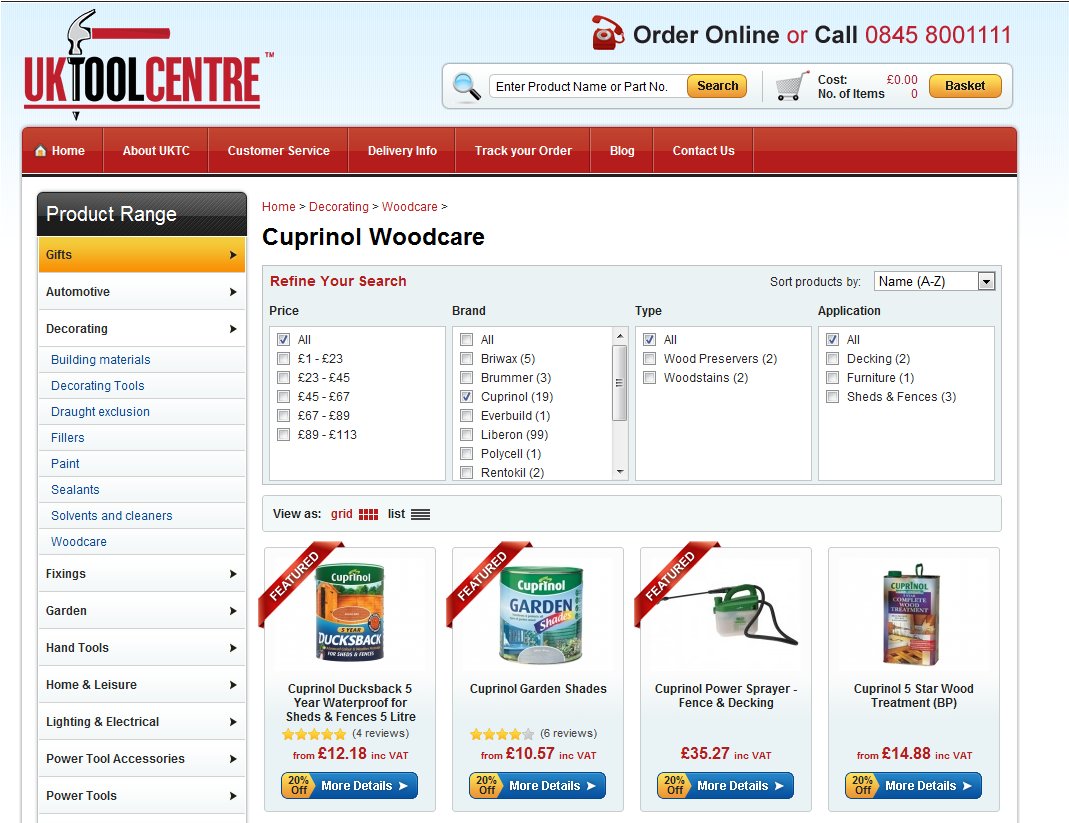
Control

In the variation, the filter menu was removed from the category, the hypothesis being that when focused on a particular product, a user did not need the menu to distract him/her away from it.
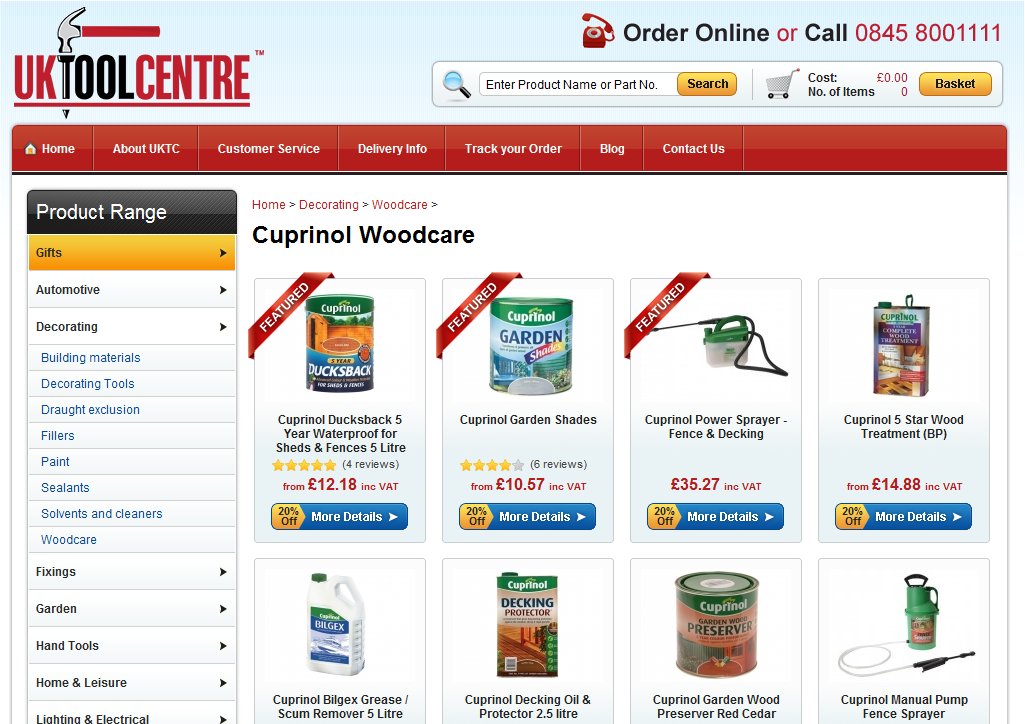
Variation

And the results? A surprising increase of 27% in engagement on the product page. What happened was that visitors were less distracted by the filter and the easy option of leaving the page that it provided. This increased site engagement meaning they clicked around more and had a better look at all the products on the page.

What learnings can be derived from this?

Don’t distract your visitors with unnecessary options and try to provide them exactly what they want. When they are looking for something, give them the tools to make that search a breezy affair. After they have found it, let them stay and look around undisturbed by other options.

Also, we cannot stress enough the importance of regular testing. Buyakilt.com experienced an increase in conversion rate when they added a product filter while UKToolCentre saw the increase after removing the filter. This just goes to show that there are no hard & fast rules and you should run tests to see what works best on your site.

Siddharth Deswal

Marketing Associate at Wingify. Have been involved with web development for about 8 years now and actively look to help online businesses discover the value of Conversion Rate Optimization.


Tags

12 Comments
Alhan Keser
July 19, 2012

Great prezi. Made the post much easier to digest and gave me a great idea for future posts of our own!

Thanks Alhan. Yeah, we were going for making the case study super easy & quick to understand.

Alex Czarto
July 19, 2012

Be careful when assuming that certain metrics are always positive: If site engagement means that the user is spending more time on interacting with your site, then my conclusion would be that 27% increased engagement actually means that it’s 27% HARDER to find the actual product you are looking for.

Similarly, a high bounce rate could mean two opposingly different things:
A) The user didn’t find what he was looking for and left.
B) The user found exactly what he was looking for and left (ie: in the case where the user is looking for you phone number on the contact us page)

Simply assuming that a figure is good or bad without asking “Why” could lead you down the wrong path.

Alex

Ulises
July 20, 2012

I really liked the Prezi! Like Alhan said, really makes it much easier to digest the content.

[...] Removing product filter on eCommerce website boosts site engagement 1 Upvotes Discuss Flag Submitted 1 min ago Tobias Dokken E-Commerce visualwebsiteoptimizer.com Comments [...]

Lars Johansson
July 20, 2012

I agree with Alex. Maybe visitors had a harder time finding what they were looking for? Engagement is a tricky metric. What was the impact of each variation on *sales*?

You know Alex, you’re right and that is one of the drawbacks of A/B testing: you will know what gets better conversion rates but not WHY it’s doing that.

For that, Usability Testing is the answer. Regarding the case study, we don’t “judge”, we simply let our customers tell us what they wanted to achieve and whether that was achieved or not. If the customer says that they were looking for better site engagement, well then that’s exactly how we will put it up in the case study.

Given that your point is valid, am sending your comment to Ewan from UKToolCentre and also inviting him to participate in the discussion here.

Thanks so much!
Siddharth

Thanks Ulises :)

Ewan
July 20, 2012

Hello! Thanks to team Wingify for the fantastic case study!

Alex & Lars – Great comments and it’s absolutely right that you question any statistic like this, and as you mention, in some cases a lower bounce rate means that you are forcing your visitors to make more clicks before finding (or not!) what they are looking for. In this sense, it’s important not to look at only one metric alone. You also have to apply the metrics to your own knowledge and insight into your product base and customers.

Without going into too much detail, in this instance we saw a rise in the number of clicks on the products themselves after removing the filter menu. Our assumption was that when landing on this page, users didn’t have to scroll so much, they could immediately see the first line of products on the page and ‘understood’ what the site was about and if it was for them. With the filter menu in place, it looked more complicated and difficult and therefore were more likely to leave the site. Most visitors arrived on this page as they were specifically looking for Cuprinol products – it doesn’t make sense to offer other brand options above the Cuprinol products. Obviously this was just the first line of testing, and going on to test add to basket rates and further, conversion rate is essential (and quite easy to do with VWO!)

We’re actually implementing a redesign based around many of the test’s we’ve performed – it’s been a real help in making decisions.

If you have any more questions – please just ask.

David
July 20, 2012

Great post and case study. Would be good to see if this does increase the add to basket and conversion rate so good luck!

Soumya Roy
July 28, 2012

Now that was cool…although I have already tried my own hands with prezi, I didn’t really pay it much respect(read time)…until now. This is a superb way for you to give something like a case study/testimonial etc related information, in almost kind of a storyboard manner. Again, that was cool.

Bryce Eldridge
December 13, 2012

I read both articles that you published on this topic. It seems like the reason the product filter was so unsuccessful on UKToolCentre was because it was the most prominent thing displayed on the webpage. Users were forced to look at this product filter and feel like they HAVE to use it in order to find the products they want. The filter they used made it seem like if the user doesn’t select from all of those options they won’t find what they’re looking for … it was just confusing.

Compare that to the filter used on FindaKilt.com where they put the search filter in the top of the left sidebar. The filter became secondary and is displayed in a common position where most websites put that filter. Users weren’t forced to use it, they had an option. I think that’s why this filter was successful.

Do you agree or disagree with this statement?

Sorry, the comment form is closed at this time. To start a discussion, please email info@wingify.com.

RSS feed for comments on this post.

I ♥ Split Testing Blog


Stay up to date

Latest Posts

Latest Tweets

Write for this blog!

We accept high quality articles related to A/B testing and online marketing. Send your proposals to contribute@wingify.com

Contact us for more information!

Your Name

Your Email

Your Message

Or, contact us through email info@wingify.com